

Launcher5 v2.5.12 by cedsaill
Game loader with 3D Cover Flow, a cover grid and a carousel for your PS5 and PS4 games, homebrew, emulators and payloads, with 17 themes
Install on your PS5
Payload: start elfldr 0.25 or newer on the PS5 first. It listens on port 9021. Then press Send to PS5 beside the file under Files, on a computer or phone on the same network. elfldr downloads the payload and runs it, so the PS5 needs to be online.
Files
| File | Size | SHA-256 | |
|---|---|---|---|
| launcher5.elf | 56.4 MB | ab66767a…8b91 | Send to PS5 Download |
Screenshots

About Launcher5
Send launcher5.elf to the ELF loader on port 9021. It adds a Launcher5 tile to the home screen and opens. After the console restarts, send it again.
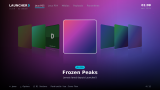
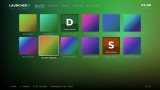
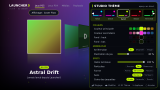
Your games and apps are split into PS5 games, PS4 games, media, homebrew, emulators, payloads, recent and folders of your own. The touchpad switches between Cover Flow with reflections, Grid and Carousel. Theme Studio picks one of 17 animated themes and sets the colours, the background (the game's art, a gradient or your own picture), halos, particles, a clock and music. Games can be renamed and hidden, and the launcher comes back by itself after a game.
- Touchpad: Cover Flow, Grid or Carousel
- L1 and R1: sections
- Cross: play or open
- Triangle: options (folders, rename, hide, theme)
- Square: move
- Circle: back
Backgrounds, music (OGG, MP3, FLAC, WAV, MOD and more) and themes (.json) go in fonds/, musique/ and themes/ under /data/launcher5 over FTP. It follows the console's language: French, English, Spanish, German, Italian or Portuguese. The developer lists a CFI-1216A on firmware 13.60.
Release notes
v2.5.12 · Launcher5 v2.5.12 · Nov 21, 2026
Envoie launcher5.elf à ton chargeur ELF (port 9021). / Send launcher5.elf to your ELF loader (port 9021).