

Lamplight v1.1.0 by HaydenGriffin
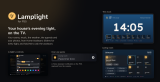
Home Assistant dashboard on the TV with a clock, rooms, controls for every light, music, weather, agenda, timers and photos, driven with the DualSense
Install on your PS5
App folder (.zip): unzip PPSA99484.zip and copy the PPSA99484 folder to /data/homebrew/ on the PS5, over FTP or from a USB drive. Some apps also need their title ID added to etaHEN's app list: the release notes say.
Payload: start elfldr 0.25 or newer on the PS5 first. It listens on port 9021. Then press Send to PS5 beside the file under Files, on a computer or phone on the same network. elfldr downloads the payload and runs it, so the PS5 needs to be online.
Files
| File | Size | SHA-256 | |
|---|---|---|---|
| lamplight-notify.elf | 991 KB | c21116de…5c60 | Send to PS5 Download |
| PPSA99484.zip | 7.3 MB | 5db089ce…33f2 | Download |
Screenshots
About Lamplight
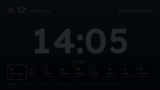
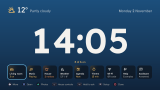
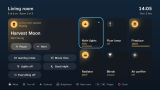
The pages of Lamplight's wall tablets as a native PS5 title. The clock is home, with a chip for each page. A room (up to six) shows what its speaker is playing, its scenes and scripts as actions, and its lights, switches, blinds, radiator and sensors as tiles. Hold Cross or press Triangle on a tile for its sheet: brightness, warmth and colour for a light, target and mode for a thermostat, position and tilt for blinds, and more. There are pages for Music, Weather, Agenda, Timers, the guest Wi-Fi as a QR code, and the assistant.
Hold R2 and speak to ask Home Assistant's Assist through the controller's microphone. When the doorbell rings, its camera fills the screen. The house's notices pop up as they arrive, and L2 opens House controls with Everything off, Good night and the house's modes. Left alone, the clock rests and dims under a live sky or a slideshow from a Home Assistant media folder.
Home Assistant has to be on your network at a numeric IPv4 address over plain HTTP. Copy the PPSA99484 folder to /data/homebrew/, open Lamplight and fill in Setup with the address, port and a long-lived token. Rooms, the doorbell and photos are set in a lamplight.conf beside eboot.bin, or from Home Assistant with the package in the source. View Assist is optional, for timers and answers. The token is kept in plain text and goes unencrypted over local HTTP.
lamplight-notify.elf is an optional payload that runs in the background and makes the PS5 a Home Assistant device: notifications over any game, the game being played, temperatures, free space, and commands to open a game, open Lamplight or rest. It needs an administrator's token in /data/lamplight/notify.json. The developer has run it all on one PS5 on firmware 7.20.
Release notes
v1.1.0 · Lamplight for PS5 1.1.0 · Nov 7, 2026
Real controls for every light, photos, music and push-to-talk. Run on one PS5 (system software 7.20) against a real Home Assistant on 6 November; see [console validation](docs/console-validation.md). Not yet run on a console: Everything off, Good night, Away, Night mode, Play everywhere and Move here, and the payload's rest command since its fix.
- Push-to-talk: hold R2 on any page and speak; Home Assistant's Assist hears it through the controller's microphone, does it and answers on screen, continuing the conversation for five minutes.
- Rooms: up to six, Square steps through them; sensors as tiles, with their units.
- Music: Now Playing for the room's player, with the cover, progress, Previous, Play or Pause, Next and the volume.
- The doorbell: its camera fills the screen for a minute when it rings, a new picture each second.
- House: the house's notices on their own page and chip, popping up as they come (an alert one takes the screen), dismissed with Cross through an event of your choosing.
- The resting clock's sky: stars and the moon in its phase, clouds, rain and snow, drawn live and faint.
- Controls for everything: hold Cross on a tile, or press Triangle, for its sheet: brightness, warmth, colour and effects on a light, and each lamp in a group; target, mode, preset and fan on a thermostat; position and tilt on blinds; speed on a fan; volume, mute, source and shuffle on a speaker; locks, vacuums, humidifiers, numbers and lists. Sliders step on the D-pad and glide on the left stick. Triangle on an action opens every lamp in the room, with one slider for them all, and the right stick sets the focused tile's level from the page.
- Scenes: a room's scenes in its main light's sheet and its All lamps sheet, with the one in force lit.
- Charts: a thermostat's and a number sensor's last 24 hours in their sheet, with the target as a line across.
- Warm-ups: a tile's
boostsare quick buttons in its sheet, each exactly the service call the settings name. A thermostat with them is taken to be run by the house's plan: its tile and sheet read the roomsensor, and nothing sets its target by hand. - House controls: L2 from any page: Everything off and Good night, two presses then Undo for the lamps, and the house's modes as switches. Visitors mode leaves only its own way out.
- Speakers: Square on Now Playing: Play everywhere, Only this room, Move here, a sleep timer, and every room's volume and its place in the group. A speaker playing with its group is the group everywhere in Lamplight.
- Slideshow: Triangle on the clock: a Home Assistant media folder and the folders inside it, shuffled, fading with a slow drift; portrait photos whole over their own blur, the right way up. Pause, step, hide the clock, and L1 and R1 for how long each stays. Setup chooses the folder and the time. Late at night it dims, and its clock goes quieter when it is left alone.
- Backgrounds: photos, a room's picture, or one picture of your own behind the clock and, blurred, behind the pages; the cover behind Now Playing.
- Camera tiles: a
camera.tile fills the screen, a new picture each second. - The photo frame: the resting clock over those photos, dimmed.
- 12 or 24 hours, automatic by Home Assistant's country or set in Setup; the forecast's rain in its own unit.
- Settings from Home Assistant: an entity's
lamplightattribute (a template sensor in the package) applies over the PS5's settings, so nothing has to be copied to the console. - The PS5 as a Home Assistant device: the payload reports the game in front as soon as it changes, and takes commands to open a game, open Lamplight or rest; the package adds
sensor.ps5_game,binary_sensor.ps5_playingand the scripts for them. - Pictures up to 4096 pixels a side are accepted (shown at most 1920 by 1080).
- From the first console run of 1.1.0: a room with five or six actions keeps its third row above the hints (the speaker card gives up a row); temperatures and percentages read to a tenth ("16.5 °C", not 16.53); a slider at rest reads what the thing reports (73%, not the step's 75%); a toast over a sheet sits at the bottom, clear of its title, and a script's own sentence stays 4.5 s; the Speakers sheet never opens on Move here, and its sleep timer names its room and keeps the choice lit while it runs; a chart's hours are whole ones; All lamps doesn't count a group whose lamps are tiles too; 12 more icons from the house's tablets, the kitchen's knife and fork among them.
- From a review of the whole of 1.1.0: a second press doesn't carry over to a Help example that settings from Home Assistant have replaced, and Help can't read past a list they've shortened; Undo for the lamps works on Help too, and is offered once the house's action has finished, so a slow script can't outlast it or undo it; Off and scenes beat levels still waiting on the lamps under them; a room's speaker controls reach its group while it plays with one; Only this room and Move here say they worked once the music has moved, not because something was already playing; a photo folder that has been emptied stops showing; a cover that couldn't be fetched is asked for again after a minute.
- The scene row's Off beats a mode that is on; a photo step pressed during a load waits its turn; the payload's rest command looks for the standby call in the library that has it (not yet run on a console).
Install: unzip PPSA99484.zip into your homebrew folder (for example with ShadowMount), then follow the README's Setup. lamplight-notify.elf is the optional notifications payload. Update the Home Assistant package (homeassistant/lamplight_ps5.yaml) too: 1.1.0's settings sensor, the game sensor and the scripts are in it. Check downloads against SHA256SUMS.