

Kabuki v0.2.0-rc.1 by stupiditytries
Control centre overlay for PS5 homebrew, opened with L3 + R3 over the home screen or a game, with system readings and tiles other payloads can add
Install on your PS5
Payload: start elfldr 0.25 or newer on the PS5 first. It listens on port 9021. Then press Send to PS5 beside the file under Files, on a computer or phone on the same network. elfldr downloads the payload and runs it, so the PS5 needs to be online.
Files
| File | Size | SHA-256 | |
|---|---|---|---|
| kabuki-ps5.elf | 1.5 MB | 26419aa7…c0c6 | Send to PS5 Download |
Screenshots

About Kabuki
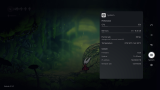
Hold L3 and R3 for half a second and Kabuki slides in from the right, drawn with the console's own interface toolkit, fonts, icons and sounds. It works over the home screen and over games. Opening the console's own control centre closes it.
Built in are a System card with CPU load, memory, temperatures and frame rate where the console gives them, and Settings for the shortcut, the hold time, sounds and the order of up to seven tiles. Other payloads can add tiles of their own: librespot-ps5, by the same developer, adds Now Playing, Queue and Library cards for Spotify. Developers get a C SDK, a provider protocol and a plugin API, with examples.
Load kabuki-ps5.elf with your payload loader, then any providers. It doesn't add itself to autoload. Settings and logs are in /data/custom-overlays. D-pad moves, Cross opens or selects, and Circle goes back or closes.
The developer lists firmware 13.20 and calls this a release candidate for people to try on their consoles. Native plugins run inside the home screen and can crash it.
Release notes
v0.2.0-rc.1 · Kabuki v0.2.0-rc.1 — Console test release · Oct 17, 2026
Kabuki is a native control panel and overlay hub for PS5 homebrew. This pre-release is available for console testing.
Tested on FW 13.20. It may work on firmware up to 13.60 and on other firmware versions, but those versions still need to be tested. Kabuki has no firmware version allowlist; runtime method and hook validation still applies. Please report your firmware version and results.
Get started
- Download kabuki-ps5.elf.
- Put the ELF on your USB drive and load it manually. If you use librespot-ps5, put the two payloads together and launch Kabuki first.
- Hold L3 + R3 for half a second to open the panel.
If you are switching from a development build, restart the console before testing this release so the previous resident worker is cleared. This release does not include development takeover support.
See the README for controls, settings and provider instructions.
Included
- Native System and Settings cards, configurable shortcut, sounds and sidebar arrangement.
- Provider protocol with built-in media and list cards.
- C SDK, native plugin API and example providers.
- Now Playing, Queue and Library cards from a compatible librespot-ps5 receiver.
- Library navigation resets when the receiver changes account or session.
- Updated README with an actual console screenshot and download instructions.
Settings and logs live in /data/custom-overlays. Kabuki does not install itself into autoload.
Build and verification
The ELF was compiled by GitHub Actions from 187180b, after the host tests passed, using the pinned community PS5 Payload SDK v0.44. It is a normal release build, without --dev.
SHA256SUMS.txt verifies the ELF, build information and bundled release notes. BUILD-INFO.txt records the exact source revision and SDK version. The release assets contain no copied console fonts, firmware modules or private working files.