

Jelly5 v0.7.0 by 02dnot
Jellyfin and Emby client with its own TV interface, 4K HDR on the console's hardware decoder, Live TV and Seerr requests
Install on your PS5
App folder (.zip): unzip Jelly5-00.007.000.zip and copy the PPSA99505 folder to /data/homebrew/ on the PS5, over FTP or from a USB drive. Some apps also need their title ID added to etaHEN's app list: the release notes say.
Files
| File | Size | SHA-256 | |
|---|---|---|---|
| Jelly5-00.007.000.zip | 57.4 MB | 559e0672…5a57 | Download |
Screenshots



About Jelly5
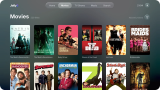
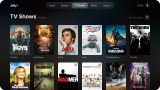
A native app for your own Jellyfin or Emby server. Home has Continue watching, Next up, Recently added and genres, and title pages carry cast, seasons, trailers, extras and theme music. Movie, TV and music libraries can be sorted, filtered and searched, and several users and servers can be saved. It follows the PS5's system language, all 27 of them.
H.264 and HEVC play on the PS5's hardware decoder at up to 4K with HDR10 and HLG, and the server transcodes what the console can't play. There are audio and subtitle tracks, online subtitle search, subtitles that sync themselves to the dialogue, Skip intro, playback speed, a night mode and optional HDMI bitstream for Dolby and DTS. Live TV from your server comes with a programme guide and recordings, music has a queue and synced lyrics, and with Seerr set up you can request films and series. On Emby, Live TV and a few other parts need Emby Premiere.
It needs ShadowMount+ and a way to copy files, such as ps5upload or FTP. Copy the PPSA99505 folder to /data/homebrew/ so that /data/homebrew/PPSA99505/eboot.bin exists, and a Jelly5 tile shows up under Media. To update, close Jelly5 with the PS button first and copy the new files over the old ones. The developer lists firmware 11.60, and a user reported 13.60.
L2 and R2 scrub faster the harder you press, Triangle searches, Square opens audio and subtitles in the player, and L3 shows playback info. The app can't quit itself, so close it with the PS button.
Release notes
v0.7.0 · Jelly5 0.7.0 · Oct 17, 2026
Jelly5 0.7.0 brings the changes currently on main since 0.6.1.
- HDR video reaches an HDR10 TV as HDR10, with clean glass overlays. (#49)
- Set the playback read-ahead buffer from 30 seconds to 5 minutes. (#54)
- Show library rows on Home as portrait posters if you prefer. (#48)
- Choose a title's media version in Options or when you press Play. (#55)
- Navigate and use media keys with the PlayStation Media Remote. (#12)
- Sign in with a server address without a scheme: Jelly5 tries HTTPS and HTTP. (#61)
Update: close Jelly5 with the PS button, then upload the new PPSA99505 folder's files over the old ones in /data/homebrew/PPSA99505/ (with ps5upload or FTP). Your accounts and settings are kept.