

HUD and DualSense Controller Overlay v1.0.0 by erickdavestech
Performance panel with FPS, power, temperatures, fan, CPU, GPU and RAM, plus a live DualSense overlay, drawn over the game you're playing
Install on your PS5
Payload: start elfldr 0.25 or newer on the PS5 first. It listens on port 9021. Then press Send to PS5 beside the file under Files, on a computer or phone on the same network. elfldr downloads the payload and runs it, so the PS5 needs to be online.
Files
| File | Size | SHA-256 | |
|---|---|---|---|
| ps5-hud-dualsense-overlay-v1.0.0.elf | 1.4 MB | 616f67eb…9e3e | Send to PS5 Download |
Screenshots
About HUD and DualSense Controller Overlay
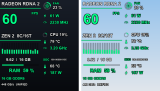
One payload draws two overlays while a game runs. Top left, a panel shows the frame rate, GPU power and clock, CPU load, temperature and clock with a bar for each of the 16 threads, fan duty, the SoC's temperature and power, and RAM in use. Bottom left, a DualSense lights up its buttons, sticks, triggers and touchpad as you use them. A value the console can't read shows --. Power updates about every five seconds, and GPU load and fan RPM aren't shown, as no system function reports them.
It waits for a real game, leaves system apps and dialogs alone, rebuilds itself when you switch games and comes back after rest mode. It runs inside the system UI (SceShellUI) and never attaches to the game process. The PS button and the Mute button don't light up.
Load the ELF once per boot with your payload manager, from its web portal or a USB drive, then open a game. Don't run it with the developer's DualSense overlay, Common FPS or SimpleFPS: they use the same process and port, and this one already has the controller overlay. To update, reboot and load the new version. The developer lists firmware 13.60 on a PS5 Slim with kstuff-lite, and the code allows 11.xx to 13.50.
Release notes
v1.0.0 · PS5 HUD and DualSense Controller Overlay v1.0.0 · Oct 5, 2026
PS5 HUD and DualSense Controller Overlay — an on-screen performance HUD and DualSense controller overlay for a PS5 running homebrew. Load it once per boot and open any game. The performance panel appears top-left and the controller bottom-left, both updating in real time.
Download
ps5-hud-dualsense-overlay-v1.0.0.elf — SHA-256 in SHA256SUMS.txt:
616f67eb96b560992689658cd68d10316ff49f68ec246014a487b545869d9e3e ps5-hud-dualsense-overlay-v1.0.0.elf
What's in v1.0.0
First release.
Performance panel (top-left)
- FPS: current frames per second, from the display controller's flip counter.
- GPU: power (W) and graphics clock (MHz).
- CPU: load, temperature, clock and a load bar for each of the 16 threads.
- Fan: duty (%) with an animated fan that speeds up with the duty.
- SoC: part number, temperature and total power.
- RAM: used / total system memory with a bar and a percentage.
Every value is measured on the console; a metric that cannot be read shows -- instead of an estimate. No boxes are drawn behind the data: each text has a thin black outline, so it stays readable without hiding the game. How each value is read is described in docs/TELEMETRY.md.
DualSense overlay (bottom-left)
The controller overlay from ps5-dualsense-overlay v1.0.1: buttons, sticks, analog triggers and touchpad light up in real time. It now scales with the scene.
Reliability
- One payload draws both overlays.
- It waits for a real game and ignores system applications and dialogs.
- It recovers after Rest Mode.
- It never attaches to, reads or writes the game process.
- The renderer log is capped so it cannot fill
/system_tmp.
Usage
- Jailbreak the console as usual (tested with kstuff-lite).
- Load
ps5-hud-dualsense-overlay-v1.0.0.elfwith your payload manager in either of these ways:
- Web portal: from a PC or phone on the same network, open the payload manager's portal using the console's local IP and upload the
.elf. - USB: copy the
.elfto a USB drive, connect it to the console and launch it from the payload manager.
- Open any game.
Load it only once per boot. Do not run it together with ps5-dualsense-overlay, Common FPS or SimpleFPS: they inject into the same system process, and this payload already includes the DualSense overlay. To update, reboot and load the new version.
Compatibility
Tested on a PS5 Slim (CFI-2015) with system software 13.60 and kstuff-lite. System software 11.xx–13.50 is allowed by the code but untested. Sensor functions are looked up at run time: if one is missing, only that metric shows --.
Known limitations
- GPU load and fan RPM are not shown: no system function reports them.
- Power values follow the system's refresh of the rails, about every 5 seconds.
- The PS button cannot be read (the system intercepts it).
- The Mute button is disabled (the controller only reports the momentary press).
Credits
- Upstream: Common FPS for PS5 by porhe911 and the SimpleFPS patch by khalifa007, by way of ps5-dualsense-overlay.
- Telemetry references: ps5-hwinfo by drakmor and RPCSX.
- Controller artwork: "PS5 Button Icons and Controls" by Zacksly (CC BY 3.0, modified).
- Build: the PS5 payload SDK, etaHEN and shsrv sources.
Full credits are in CREDITS.md.
License
GPL-3.0-or-later; the controller artwork remains CC BY 3.0. The complete corresponding source for this binary is tag v1.0.0 (source archives attached below). Rebuilding the tag reproduces the ELF byte for byte.
PlayStation, PS5 and DualSense are trademarks of Sony Interactive Entertainment Inc. AMD, Radeon and Zen are trademarks of Advanced Micro Devices, Inc. This project is not affiliated with or endorsed by Sony or AMD. See the legal notice.