
Home5 v1.0.3 by bornaradusin
Home Assistant on the PS5: make rooms of your lights, blinds, thermostats and scenes and run them with the DualSense, triggers pushing back as you dim
Install on your PS5
App folder (.zip): unzip PPSA11019.zip and copy the PPSA11019 folder to /data/homebrew/ on the PS5, over FTP or from a USB drive. Some apps also need their title ID added to etaHEN's app list: the release notes say.
Files
| File | Size | SHA-256 | |
|---|---|---|---|
| PPSA11019.zip | 7.9 MB | ac97390d…3a1d | Download |
Screenshots

About Home5
Copy the PPSA11019 folder to /data/homebrew/ and start Home5 from Media. Sign in with your Home Assistant's address by IP (http://192.168.1.20:8123, since homeassistant.local doesn't work on the PS5), your user name and password, and the two-step code if you use one. Home5 keeps a sign-in token, never the password. Or put a home5.txt with the address and a long-lived token at the top of a USB drive, choose it at sign-in and delete the file afterwards.
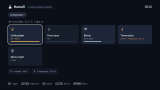
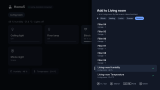
Rooms are your own and live on the PS5 only. Options, New room, then pick what goes in from Home Assistant's list, searched with Triangle and filtered by kind with L2 and R2. A device can be in more than one room. Lights switch, dim and change colour, and switches, fans, blinds, thermostats, locks, media players, scenes, scripts and buttons work too, with sensors showing their values. Cameras, alarm panels, vacuums and the voice assistant aren't supported yet.
- Cross: switch on or off, open, run a scene
- L2 / R2: dim and brighten, temperature, blind position, fan speed
- Triangle: a light's or a thermostat's own screen
- L1 / R1: previous or next room
- Left / Right on a light's screen: its colour
- Options: the menu
- Circle: back
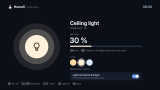
The triggers push back as you dim a light, and the light bar can glow in the colour of the light you're on. Home Assistant's notifications show as console notifications. HTTPS works with a publicly signed certificate, such as a Nabu Casa address, and .crt files in /data/homebrew/PPSA11019/assets add certificate authorities of your own. For a log, put an empty home5-log.txt at the top of a USB drive.
Release notes
v1.0.3 · Home5 1.0.3 · Oct 31, 2026
What's new
- Your own certificates for HTTPS. Home Assistant behind a reverse proxy or ingress with its own certificate authority now works over
https://: put the authority's.crtfile in/data/homebrew/PPSA11019/assets/, and Home5 trusts it alongside the console's and its own. Thanks to @tonytwostep for this one. - Coming from 1.0.2: your rooms and sign-in stay. If you add a
.crtfile, keep a copy: a clean reinstall replaces the app's folder.