

ghostcontrol-8bitdo v0.4 by kh-mitya
Xbox controllers on the PS5 as DualSense pads, through the 8BitDo USB Adapter 2 or a USB cable, up to four at once
Install on your PS5
Payload: start elfldr 0.25 or newer on the PS5 first. It listens on port 9021. Then press Send to PS5 beside the file under Files, on a computer or phone on the same network. elfldr downloads the payload and runs it, so the PS5 needs to be online.
Files
| File | Size | SHA-256 | |
|---|---|---|---|
| GC_v0.4_8bitdo.elf | 217 KB | 9d6dce7f…a5fc | Send to PS5 Download |
Screenshots
About ghostcontrol-8bitdo
Put the 8BitDo USB Adapter 2 in Switch mode (hold View and LB for 3 seconds) and whatever it pairs with comes up as a DualSense: an Elite Series 2, a Series X|S or One pad, a Switch Pro controller and more. Wired Xbox One and Series pads work over USB too, and so do Switch Pro and 8BitDo pads in Switch mode. Up to four controllers at once, in any mix. The first goes to the user at the screen, and each one after that gets the console's own "Who is using this controller?" prompt.
Load ghostcontrol-8bitdo.elf with your payload loader, and press a button when the notification says a controller was found. Controllers can be plugged in and pulled out at any time, and rest mode is handled. Buttons go by position, the Xbox button is PS, View is Create, Menu is Options, and View and Menu together click the touchpad. Remapping is done in the adapter's own profile in 8BitDo's PC software, with stick Y inversion left off.
To stop or update it, send it again or create /data/ghostpad/stop. The author warns that killing it from a task manager can crash the console. There's no rumble, no player lights and no Elite paddles, triggers are on or off through the adapter, and Xbox 360 pads aren't supported. The author hasn't tried wired pads or more than one controller on a console yet.
The developer lists a PS5 Slim on firmware 12.60. It's a cut-down rework of StonedModder's GhostControl.
Release notes
v0.4 · ghostcontrol-8bitdo v0.4 · Nov 13, 2026
What's new in 0.4
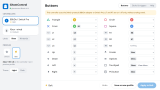
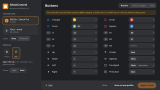
Button mapper in the console's browser
- A GhostControl 8BitDo tile in Media opens the page (also
http://<ps5-ip>:8096/from a phone or computer). - Every PlayStation button with its own glyph; pick the controller buttons that press it (several allowed). The D-pad is four separate rows.
- Sticks & triggers: swap sticks, invert any axis, dead zone per stick, LT / RT press point, View + Menu touchpad on / off.
- Light theme, or graphite dark theme with an orange accent; the browser remembers the choice.
- Built for the console browser's stick cursor: large targets, rows light up while you press the buttons.
Profiles
- Shared by all controllers, each controller remembers its own.
- No typing: a new profile gets a symbol name (Bolt, Leaf, Drop, Heart, …), which is also what the notification shows.
- Xbox + RB / Xbox + LB on the controller: next / previous profile. No 8BitDo combo uses the Xbox button, so the adapter's mode cannot change by accident.
- Default is built in and read-only; Apply saves into the current profile, Save as new profile makes another.
- Buttons are stored by position, so a profile works the same on Xbox and Switch-layout pads. Xbox / Nintendo labels for adapter controllers.
Other
- The Media tile is registered once, like ShadowMountPlus and Web File Manager do, and again only if it is removed or its icon changes.
- The release file is named so Payload Manager shows GC 8bitdo, version v0.4.
Install
Download GC_v0.4_8bitdo.elf and load it with Payload Manager (upload, keep the file name) or any ELF loader on port 9021. See the README.
Coming from 0.3: just load 0.4; it takes over from the running copy. Every controller starts on the Default profile.
Tested on a PS5 Slim, FW 12.60, with an Xbox Elite Series 2 on the 8BitDo USB Adapter 2. Wired Xbox pads and several controllers at once are still untested on hardware.
Homebrew, not affiliated with Sony, Microsoft, Nintendo or 8BitDo.