

Forwarder Manager v00.001.006 by heydemoura
Makes and edits home-screen tiles that start an emulator straight into one game, with icons from SteamGridDB or your own pictures
Install on your PS5
App folder (.zip): unzip PPSA99930.zip and copy the PPSA99930 folder to /data/homebrew/ on the PS5, over FTP or from a USB drive. Some apps also need their title ID added to etaHEN's app list: the release notes say.
Files
| File | Size | SHA-256 | |
|---|---|---|---|
| PPSA99930.zip | 23.1 MB | 986eb9bc…9a1d | Download |
Screenshots



About Forwarder Manager
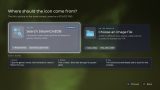
A forwarder is a tile on the home screen that opens another app, usually an emulator, with a game and launch arguments. Forwarder Manager lists the ones in /data/homebrew, edits and deletes them, and makes new ones: name, target app, title ID, a ROM picked with its file browser, an exit-after-game option and extra arguments. It's a console version of Martin Pham's ps5-forwarder.mph.am web tool, written again from scratch.
For ProsperoEden, PS5X360 and SwanStationPS5 it lists the games those emulators find, with their covers, and the cover becomes the tile icon. It also makes tiles that start a ProsperoLight stream of one app from a paired PC. Icons and backgrounds come from SteamGridDB or any picture on the console. Selection music can be an audio file or a search for the game's theme on YouTube, converted through the ps5-forwarder.mph.am service.
It needs elfldr on port 9021 and ShadowMountPlus to register the tiles, and it carries its own Lapy helper for /data. Copy the PPSA99930 folder to /data/homebrew/. To update, replace the folder: your forwarders are kept.
Release notes
v00.001.006 · Nov 1, 2026
Accept ProsperoEden's second title ID, and move the OpenGL SDK to a maintained mirror.
Added
- ProsperoEden ( Mirror ) target. ProsperoEden ships under two title IDs; the target picker now offers
PPSA99016as "ProsperoEden ( Mirror )" alongside the originalPPSA99008. Both follow the same rules for launch arguments and the game list, so a forwarder can target whichever ProsperoEden is installed. (#35)
Fixed
- Reproducible builds. The pinned OpenGL SDK download moved to the maintained darkxex/ps5-opengl mirror (SDK 1.0.2) after the previous mirror became unavailable. Both the archive and manifest SHA-256 checks remain enforced; the SDK layout and 1920x1080x60 display profile are unchanged. (#35)
Requirements
- A jailbroken PS5 with elfldr on port 9021.
- ShadowMountPlus, to register the app and the forwarders it creates.
Install
Unzip PPSA99930.zip and copy the PPSA99930 folder to /data/homebrew/, replacing the old one. Your forwarders are kept. SHA256SUMS contains the ZIP's checksum.