
FBNeo v2.4 by MisterTemaki
FinalBurn Neo's arcade drivers as a native PS5 app: CPS-1 to CPS-3, Neo Geo, Cave, PGM, Sega boards and Daytona USA, from your own ROM sets
Install on your PS5
App folder (.zip): unzip FBNeoPS5-v2.4-PPSA99924.zip and copy the PPSA99924 folder to /data/homebrew/ on the PS5, over FTP or from a USB drive. Some apps also need their title ID added to etaHEN's app list: the release notes say.
Payload: start elfldr 0.25 or newer on the PS5 first. It listens on port 9021. Then press Send to PS5 beside the file under Files, on a computer or phone on the same network. elfldr downloads the payload and runs it, so the PS5 needs to be online.
Files
| File | Size | SHA-256 | |
|---|---|---|---|
| FBNeoPS5-v2.4-PPSA99924.zip | 87.7 MB | 8594d258…0743 | Download |
| FBNeoPS5-v2.4.elf | 29.2 MB | cc666b4a…a41e | Send to PS5 Download |
Screenshots

About FBNeo
FinalBurn Neo 1.0.0.3 built for the PS5 with its arcade drivers only, 8,394 of them: Capcom CPS-1, CPS-2 and CPS-3, Neo Geo MVS and AES, IGS PGM and PGM2, Cave, Toaplan, Psikyo, many Sega boards, Konami, Taito and more. Version 2.2 added Killer Instinct 1 and 2 from their hard disk images, and 2.3 Sega Model 2's Daytona USA. FBNeo's home-console drivers and the Neo Geo CD aren't in it.
No ROM sets are included. Copy yours (.zip or .7z, one per set, named as FBNeo names them) to /data/fbneo/roms or fbneo/roms on a USB drive, or read them from an SMB or NFS share. Clones need their parent, and Neo Geo and PGM games need neogeo.zip or pgm.zip. Each release has a DAT file to check your sets against in ClrMamePro or RomVault, and the shelf lists only complete sets.
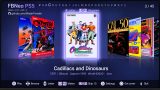
Games sit on a 3D shelf with covers, sorted by maker and letter, with favourites. There are button layouts for fighting and driving games, DIP switches, save states, high scores with hiscore.dat, samples, CRT filters drawn on the GPU since 2.4, and updates from GitHub inside the app. The author marks the new two-console rollback netplay as experimental.
It needs kstuff (or kstuff-lite), an ELF loader on port 9021 and ShadowMountPlus. Send FBNeoPS5-v2.4.elf once: it installs the app in /data/homebrew/PPSA99924/ and stays running as its helper. In a game L3 + R3 opens the menu, the touchpad click is Coin and Options is Start.
Release notes
v2.4 · FBNeo PS5 2.4 · Nov 10, 2026
New: GPU presentation and CRT filters
FBNeo PS5 2.4 adds Vulkan/RADV output. The CPU core generates the original game frame; the GPU handles texture scaling, CRT filtering, interface composition and final presentation.
- Eleven CRT filters now run on the GPU, including the default CRT Easymode style.
- Aspect ratio, smoothing, scanlines, vertical games, HUD transparency and pause-menu dimming are preserved.
- ScaleFX + rAA + AA style keeps its CPU filter with GPU presentation.
- Software output remains available: set
gpu=0infbneo-ps5.iniand restart the app. Initialization or submission failures also have software recovery paths.
Initial PS5 logs confirm 3840x2160 output at 59.940 Hz. Sampled rates settle at 57.5 fps in Daytona USA and 59.9 fps in Cadillacs and Dinosaurs and Contra. Crime Fighters also starts. The observed Easymode style GPU pass takes 0.4–0.6 ms, and both logged sessions exit normally. These are initial results, not a claim of universal game/filter compatibility or native 4K game rendering.
New: experimental two-player rollback netplay
With a compatible two-player game running, press L3 + R3 → Netplay. Choose Host a game (Player 1) on one installation, and enter its IPv4 address and matching TCP port on the other before selecting Join a game (Player 2). The default port is 55435. Both players must resume after connecting.
Use the same 2.4 build, matching ROM/BIOS content and DIP settings. This uses a direct connection between two FBNeo PS5 installations. It does not connect to Fightcade, Kaillera, RetroArch or arcade link cabinets. Games with writable hard disks are unsupported. Disconnecting restores each player's pre-session offline state; online progress is not saved.
Netplay is experimental. Local TCP tests and two complete Linux frontends pass real rollback/replay, pause and disconnect checks, including Vulkan output. A session between two physical PS5 consoles has not yet been validated. See the netplay guide.
Compatibility and stability
- Fix an audio-ring race that could read beyond the producer's input buffer.
- Handle worker-allocation failures and configuration/update I/O failures more reliably.
- Fix undefined numeric behavior in Model 2 rendering and i960 handling.
- Strengthen malformed-file, image-resize and release-update validation.
- Preserve existing saves, ROMs, settings, shader IDs and the
PPSA99924title ID. - Verify that the final installer contains the complete application and its dependency notices.
Updating and files
Use FBNeoPS5-v2.4.elf to install or update the existing 2.3 app. This release provides one final ELF installer, with GPU and software fallback in the same app. fbneo-pie.elf and fbneo-gpu-pie.elf are intermediate developer files and are not installers.
FBNeoPS5-v2.4.elf— complete installer, approximately 30.6 MB.FBNeoPS5-v2.4-PPSA99924.zip— app folder and manifest used by the built-in update feature.FBNeoPS5-v2.4-arcade.dat— ROM DAT for this version.SHA256SUMS.txt— checksums for the three files above.
The installed app identifies itself as FBNeo 1.0.0.3 - PS5 2.4. Initial console logs confirm the 2.3-to-2.4 update. A separate automated upgrade test preserves ROM, save-state and settings fixtures byte for byte.
Validation
The final package passes 90 frontend/installer/update checks, 26 GPU adapter checks, embedded-file verification and update-ZIP integrity checks. Additional core, netplay, CPU-only and failure-path regressions pass. The validation report distinguishes Linux tests from the supplied PS5 hardware results and records remaining limits. See GPU settings and build requirements.
SHA-256
cc666b4a6282ad3c49182e28e7356934b444d661372d450a42521a34ce39a41e  FBNeoPS5-v2.4.elf
8594d2586b6d280642a4373222afb88ed830605d56cb389eb6e23dfb0b840743  FBNeoPS5-v2.4-PPSA99924.zip
3f95e8e3754d9db3f8e46bc263ba56f08e7c919d04af1b5a882b63230ef8b4f6  FBNeoPS5-v2.4-arcade.dat