

ELF launcher v2.1.6 by X-F1REBALL-X
Home screen tile and web page for loading ELF payloads, with a catalogue, autoload profiles and updates
Install on your PS5
Payload: start elfldr 0.25 or newer on the PS5 first. It listens on port 9021. Then press Send to PS5 beside the file under Files, on a computer or phone on the same network. elfldr downloads the payload and runs it, so the PS5 needs to be online.
Files
| File | Size | SHA-256 | |
|---|---|---|---|
| elf-launcher.elf | 1.4 MB | 5c4a9c31…a9d2 | Send to PS5 Download |
Screenshots
About ELF launcher
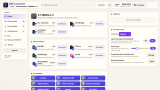
It needs elfldr on port 9021. Once loaded, it adds an Elf Launcher tile under Games and serves a page on port 1000, which opens from the tile, the PS5 browser, or a phone or PC on your network.
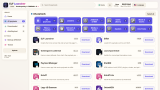
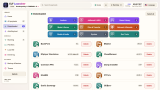
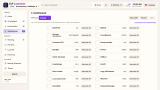
The catalogue sorts payloads into nine folders, from Loaders to Dev Tools. Download one once and load it whenever you want, and pin the ones you use most to the top. AutoPayload loads chosen payloads after every jailbreak, with several profiles and a start delay of up to 10 seconds. Saved payloads can be updated from their latest releases, and the launcher updates itself.
There's also a file manager, a text editor that keeps backups, a process list, an event log, and buttons for Restart, Rest mode and Power off. An ELF can be loaded from your phone, a USB drive or a path on the console, and your settings backed up to USB or /data. Seven themes and ten languages.
Release notes
v2.1.6 · Elf Launcher 2.1.6 · Nov 12, 2026
A cleaner interface, a more capable file manager, and catalog updates.
Interface
- The top bar is tighter: search fills the middle, and language stays on the right.
- The Library sidebar is better spaced, with the console IP at the bottom.
- The Running list scrolls properly, and status messages are shown in full.
PS5 Files
- Root lists all folders and files.
- Text files can be viewed and edited. A yellow notice is shown in Root.
- Write and delete are available where the console allows it. Errors are shown in full.
Load file
- Clear log also clears the Recent list.
Catalog
- Popular is sorted by GitHub stars.
- WK Store uses the current icon. The old WK Autoloader entry was removed.