

Ebook Reader v0.2.6 by Yahballon
EPUB and CBR/CBZ comic reader with a wooden bookshelf of covers, zoom, one or two pages per screen and saved progress, and text-only PDF
Install on your PS5
App folder (.zip): unzip PPSA99741.zip and copy the PPSA99741 folder to /data/homebrew/ on the PS5, over FTP or from a USB drive. Some apps also need their title ID added to etaHEN's app list: the release notes say.
Files
| File | Size | SHA-256 | |
|---|---|---|---|
| PPSA99741.zip | 6.3 MB | 25c61587…6aba | Download |
Screenshots
About Ebook Reader
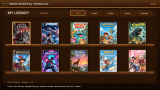
EPUB books show their text, pictures and cover. CBR (RAR4 and RAR5) and CBZ comics open page by page, with zoom up to 400%. PDFs only get their text, without the layout or pages that are pictures. The bookshelf has All, Comics, Fiction, Novels and Favourites, a list view, and it remembers where you were in each book.
Put books in /data/EbookReader/Books/, subfolders included, or in /Books/ on a USB drive. Books on USB are listed and copied over by the included bookscan.elf, which needs the ELF loader running on port 9021, with a progress bar while big comics come across. The copies go in /data/EbookReader/Cache/, which the app clears out by itself, so don't keep your only copy there. Password-protected and multi-part RARs don't open.
Copy the PPSA99741 folder from the zip to /data/homebrew/, with every file in it, and register it with your loader. Covers are kept in /data/EbookReader/Covers/, and a log in /data/EbookReader/ebook-reader.log.
In the library:
- Cross: open, Square: favourite, Triangle: storage and import
- L1 and R1: collection, R2: shelf or list, Options: refresh the library
- L3: delete an imported book, Circle: quit, with a Yes or No
Reading:
- L1 and R1, or Cross: turn the page
- L2 and R2: zoom, D-pad: pan when zoomed
- Square: one or two pages (in comics, the last page), Triangle: first page
- Circle: back to the library
Release notes
v0.2.6 · PS5 Ebook Reader v0.2.6 · Oct 15, 2026
Ebook Reader v0.2.6 — Exit Confirmation
New
- Circle on the My Library home screen opens a Yes/No confirmation dialog instead of closing the app immediately.
- Cross selects Yes and exits; Circle selects No and returns to My Library.
- Modal consumes input so it cannot accidentally open another book or navigate under the confirmation.
- Existing Circle / Back controls in the book reader and USB Storage screen are unchanged.
Safe shutdown
- Save existing book reading state before quitting.
- Wait for any detached thumbnail, image or book-load workers to finish before releasing PS5 rendering resources.
- Leave all local books, existing covers, settings and USB cache untouched.
Verification
- Host controller-state tests cover confirmation, cancellation, accidental simultaneous presses and repeated opens.
- GitHub Actions compiles the native PS5 application and validates a complete PPSA99741.zip. Real PS5 hardware testing still needed.
Installation
Install PPSA99741.zip through TESTBUILDS and keep your existing /data/EbookReader/Books and settings intact. Title ID PPSA99741.