

DualSense deadzone v0.1 by Iziman127
Hides stick drift on a DualSense with a deadzone aimed at the drift, set up from a browser
Install on your PS5
Payload: start an ELF loader on the PS5 first, such as elfldr, which listens on port 9021. Then open this address in a browser on a computer or phone on the same network, with your PS5's address in place of PS5. elfldr downloads the payload and runs it.
http://PS5:9021/?uri=https%3A%2F%2Fstore.brewology.com%2Fdl%2F2641%2Fps5-dualsense-deadzone.elf
Files
| File | Size | SHA-256 | |
|---|---|---|---|
| ps5-dualsense-deadzone.elf | 216 KB | a9ea1129…dbfa | Download |
Screenshots
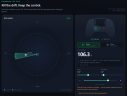
About DualSense deadzone
Calibrate from a browser on your phone or computer at port 8089, with only the drifting controller on and the PS5 on the home screen. The page shows where the stick really rests. Aim the cone, set its width and range, press Apply, then start your game. The filter follows into the game if its controller library matches. If not, it says why and leaves the game alone.
The setting is saved in /data/ps5-dualsense-deadzone.conf and comes back the next time you load the payload. Disable filter puts the controller back to normal, and Quit stops the payload. The developer lists firmware 10.20. On other firmware it should refuse and say why on the page.
If a game won't start with the filter on, press Disable filter, start the game, and press Apply once you're in. Every controller gets the same setting, and the web page has no password, so anyone on your network can open it. It hides drift, it doesn't fix a worn stick.
Release notes
v0.1 · Oct 13, 2026
Deadzone filter for a drifting DualSense on a jailbroken PS5.
A classic circular deadzone eats a bit of every direction. This payload aims a cone at the drift instead: only movements inside the cone, up to the chosen range, snap back to center. Everything else passes through untouched. A circle mode is one tap away.
Install
Send ps5-dualsense-deadzone.elf to your ELF loader (elfldr on port 9021), or upload it through the PS5 Payload Manager (port 8084) — see the README for the exact commands. Then open http://<your-ps5-ip>:8089/ in a browser and calibrate with the live view of the raw stick.
SHA-256 of the attached ELF:a9ea11297b58f66d1ba693c53c4a4e4bbad37ec455fc9bb0b56dc16e2c6ddbfa
Highlights
- Cone deadzone (angle, width, range) per stick, or circle mode, aimed at one-direction stick drift.
- Hooks the home screen and follows into the running game automatically.
- Remembers the setting on the console (
/data/ps5-dualsense-deadzone.conf) and reapplies it when the payload is loaded again. - Self-contained web UI, no external resources; the only file written on the console is the saved setting.
- Refuses to patch anything it does not recognize: readers resolved by name and pinned by their instruction bytes, imports found by scanning memory, all-or-nothing hooking, verified writes, full rollback.
Known issues
- One setting for all controllers.
- The filter hides the drift, it does not repair the worn potentiometer.
- The web UI is reachable by anyone on your LAN; there is no authentication.
- Some games do not load with the filter on (black screen): disable, launch the game, apply again — see the README.
Compatibility
Tested on firmware 10.20. Other firmwares are not tested: an unrecognized layout is refused cleanly (the UI says why) instead of being patched blindly.
Disclaimer
Hobbyist homebrew for a jailbroken console, provided as is, without warranty of any kind. Not affiliated with or endorsed by Sony Interactive Entertainment.