
DriftCheck v01.000.000 by felipemelchior
DualSense tester that shows every stick, button, trigger and sensor reading, and measures stick drift with a suggested deadzone
Install on your PS5
App folder (.zip): unzip PPSA98766.zip and copy the PPSA98766 folder to /data/homebrew/ on the PS5, over FTP or from a USB drive. Some apps also need their title ID added to etaHEN's app list: the release notes say.
Payload: start elfldr 0.25 or newer on the PS5 first. It listens on port 9021. Then press Send to PS5 beside the file under Files, on a computer or phone on the same network. elfldr downloads the payload and runs it, so the PS5 needs to be online.
Files
| File | Size | SHA-256 | |
|---|---|---|---|
| DriftCheck.elf | 1.4 MB | 99f14fd6…01fb | Send to PS5 Download |
| PPSA98766.zip | 123 KB | 06fa838c…c86c | Download |
Screenshots

About DriftCheck
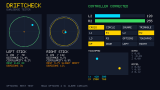
Press and release Options, then let go of both sticks for three seconds. Each stick gets a verdict, OK, slight drift, drift, or touched and redo, and a suggested deadzone drawn as an orange ring. Rotate a stick all the way round and it traces how far it reaches in 72 directions and gives the average error. Hold Options for two seconds to clear the traces.
It also shows L2 and R2 from 0 to 255, every button an app can read, the touchpad with up to two fingers, and the accelerometer and gyroscope. Create and the PS button never reach an app, so they can't be tried here. It reads one controller, the one of the user who started it, and shows no battery level yet.
At rest, 5% off centre counts as slight drift and 10% as drift. The author calls these a starting point, not a measured standard: the number is for comparing controllers, or a pad before and after a repair. The suggested deadzone is the resting distance rounded up, plus two points.
It needs an ELF loader on port 9021, kstuff and ShadowMountPlus. Send DriftCheck.elf to the loader and it writes the app to /data/homebrew/PPSA98766/ and confirms with a notification. Or copy the PPSA98766 folder from the zip over FTP, with every file at mode 0777, or the console shows CE-107750-0. The log is in /data/driftcheck/driftcheck.log.
Release notes
v01.000.000 · DriftCheck 01.000.000 · Oct 10, 2026
Full Changelog: https://github.com/felipemelchior/driftcheck5/commits/01.000.000