
DreamXcast ps5-dreamcastx-v0.2.2 by Yahballon
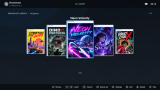
Dreamcast emulator built on Press5elect's PSFlyCast, with a cover-flow shelf of white game cases for console, USB and network games
Install on your PS5
App folder (.zip): unzip PPSA99765.zip and copy the PS5DreamcastX folder to /data/homebrew/ on the PS5, over FTP or from a USB drive. Some apps also need their title ID added to etaHEN's app list: the release notes say.
Files
| File | Size | SHA-256 | |
|---|---|---|---|
| PPSA99765.zip | 15.6 MB | 1da561f4…9721 | Download |
Screenshots
About DreamXcast
DreamXcast is Press5elect's PSFlyCast, the PS5 build of Flycast, with a new front end by Yahballon. The emulator part is PSFlyCast 1.1.0 from 7 October, and the author says only the branding, the shelf, the paths, the icon and the update feed were changed. The in-game menu, saves, disc switching and controller mapping are PSFlyCast's, and so is the manual. PSFlyCast has had newer releases since.
What it adds is the library. Your games stand in a cover flow of white DVD-style cases, with Grid and List views, search, Favourites and Recently played. Games on the console, on USB drives and on up to six SMB network shares all go in one list, and the shares are set in Settings, Library.
No games or BIOS are included. It reads CHD, GDI, CDI and CUE files from /data/PS5DreamcastX/games/, or from a PS5DreamcastX folder on a USB drive, including the folders inside it. A BIOS is optional and goes in /data/PS5DreamcastX/bios/. Saves, VMUs, covers and settings stay in /data/PS5DreamcastX/ too, and the app installs to /data/homebrew/PS5DreamcastX/ as PPSA99765.
It needs an ELF loader on port 9021 to reach /data and USB drives. Without one it keeps its files in its own app folder. The author calls the integration experimental.
- D-pad or left stick: move between covers
- Up and down: change shelf
- Cross: start the game
- Triangle: game details
- Square: scan the library again
- Options: settings
- Circle: back
Release notes
ps5-dreamcastx-v0.2.2 · DreamXcast v0.2.2 · Oct 17, 2026
DreamXcast v0.2.2
PS5 home menu neon icon fix
- Replaced the obsolete generated blue X launcher icon with the user-provided metallic DreamXcast neon emblem.
- The native PS5 build now decodes
assets/dreamxcast-neon.avifand installs it intoPS5DreamcastX/sce_sys/icon0.png. - Enforced build/package verification to reject a stale icon in the signed ZIP.
- Increased
contentVersionso the PS5 recognizes this as a newer installation. - Preserved Title ID
PPSA99765, saves, cover cache, internal/USB/SMB game loading, and the existing UI.
Install the updated PPSA99765.zip through your usual homebrew installation flow. If the home screen still caches the old icon, remove/reinstall the app (preserve /data/PS5DreamcastX).