

Discord RPC v1.1.0 by azurejelly
Shows the game you're playing on the PS5 as your Discord status
Install on your PS5
Payload: start an ELF loader on the PS5 first, such as elfldr, which listens on port 9021. Then open this address in a browser on a computer or phone on the same network, with your PS5's address in place of PS5. elfldr downloads the payload and runs it.
http://PS5:9021/?uri=https%3A%2F%2Fstore.brewology.com%2Fdl%2F2408%2Fps5-discord-rpc.elf
Files
| File | Size | SHA-256 | |
|---|---|---|---|
| ps5-discord-rpc.elf | 588 KB | a4be9cd7…e946 | Download |
Screenshots
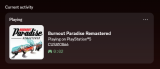
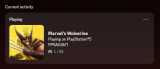
About Discord RPC
Two halves: a payload on the PS5, and a small Python client on your computer that passes the game on to Discord. The client needs Python 3.9 or newer and runs from the source after you fill in its .env file. The author made it for personal use and only covers setting it up on Linux and macOS.
The PS5 side listens on port 7270. That can be changed in /data/ps5-discord-rpc/config.ini, which appears the first time it runs.
The PS5 side listens on port 7270. That can be changed in /data/ps5-discord-rpc/config.ini, which appears the first time it runs.
Release notes
v1.1.0 · Oct 22, 2026
Tested on 13.40, adds a config file
Full Changelog: https://github.com/azurejelly/ps5-discord-rpc/compare/1.0.0...1.1.0