
Codex PS5 v0.0.5 by Portablelle
Unofficial client for OpenAI's Codex on the PS5, signed in with your ChatGPT account, with voice input turned into text on the console and file actions you approve
Install on your PS5
App folder (.zip): unzip codex-ps5-0.0.5-Folder.zip and copy the PPSA99105 folder to /data/homebrew/ on the PS5, over FTP or from a USB drive. Some apps also need their title ID added to etaHEN's app list: the release notes say.
Files
| File | Size | SHA-256 | |
|---|---|---|---|
| codex-ps5-0.0.5-Folder.zip | 177.1 MB | b753329c…e5c2 | Download |
Screenshots



About Codex PS5
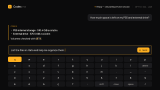
Talk to Codex from the couch. The Codex engine and its file tools run on the console, and replies come from the online Codex service through your ChatGPT account, which needs Codex access. Ask about your files and storage, browse folders, read text and have Codex move or edit files. Commands and file changes that need your approval show up on the TV with a plain line such as 'Moving a file', with Decline picked by default.
Press Triangle to dictate: Whisper turns your voice from the DualSense microphone into text on the console, and the audio stays there. Check the text, then press Options to send it. The app follows the console language, English or French, and the last conversation comes back when you reopen it.
You need both files from the same release. Copy the PPSA99105 folder from the Folder zip to /data/homebrew/, with sce_sys, sce_module and assets (the Whisper model is inside). Put assistant-service.elf in /data/codex-ps5/payloads/assistant-service/, create /data/ps5-ai-cli, and send the same ELF to the ELF loader on port 9021. Once ShadowMountPlus has registered the title, open Codex PS5 and press L1 to sign in with a code you confirm on your phone. Send the service again after every reboot. When you update, keep /data/codex-ps5/home and /data/codex-ps5/workspace: they hold your sign-in and files.
- Triangle: start or finish dictation
- Square: open or close the keyboard
- Options: send the prompt
- L1: sign in
- L2: model and reasoning effort, while idle
- Circle: cancel dictation, stop a reply, or decline
- Touchpad click: quit
The author calls it an early prototype. The engine runs with the payload's permissions and no sandbox, and the local service sockets have no password. The developer lists firmware 13.00 with Relapse, kstuff and ShadowMountPlus.
Release notes
v0.0.5 · Codex PS5 0.0.5 — native prototype · Nov 1, 2026
Codex PS5 is a native homebrew assistant for a jailbroken PS5, with controller input and local voice transcription. This is an early prototype, independent of OpenAI and Sony.
Install or update
Download codex-ps5-0.0.5-Folder.zip and assistant-service.elf below. Both are required. The ZIP includes the complete Whisper Small Q5_1 model; no separate model download or build is needed.
Replace both components from the same release: the UTC fix is in the ELF, the model picker in the app. Preserve /data/codex-ps5/home, /data/codex-ps5/workspace, /download0/codex-ps5-conversation and /download0/codex-ps5-model when updating.
Installation, updates and rollback guide · README
What's new since 0.0.4
- Choose the model and reasoning effort (#37): press L2, or enter
/modeland press Options, while Codex is idle. The list comes from the engine for your account; up/down picks the model, left/right the effort. The choice applies from the next prompt, is shown in the header, and is kept for the next launch. GPT-6.1 SOL with low effort stays the default, and the in-game companion keeps it. - Conversations start on consoles that cannot report their local UTC offset (#36): Codex now dates the session folder in UTC instead of failing with "The system's UTC offset could not be determined".
The experimental in-game companion is not included in the downloads. Prompts interrupted by a disconnect are never automatically resent.
Build validation
- Host test suite passed on macOS and in CI (Linux, macOS), and the PS5
-Werrorcompile checks passed in CI. - Full native and backend PS5 builds passed in the isolated
codex-runnertoolchain image on the dedicated build server, from a clean checkout; the host test suite also passed there. - Packaging verified the model checksum, native title version (
00.000.005), and current backend build identity (880aa318…, matching the commit). All release download SHA-256 checksums passed on the build server and again locally. - Built from commit
8e7f8874cf711684e104646f51760d4b4a166851(PR #40). - No new end-to-end console test is claimed. Runtime execution and firmware compatibility remain unverified for these builds, and the UTC fix could not be reproduced on the validation console.
SHA256SUMS covers every accompanying download. The Folder ZIP includes its notices; licenses.zip supplies notices alongside the standalone ELF.