

chiral-ftp v1.2 by Herbrax
FTP server, two-pane file manager and FTP and SFTP client on the TV, plus a file manager in your browser, with matching apps for PC, Mac, Android and Switch
Install on your PS5
App folder (.zip): unzip chiral-ftp-ps5-1.2.zip and copy the PPSA96024 folder to /data/homebrew/ on the PS5, over FTP or from a USB drive. Some apps also need their title ID added to etaHEN's app list: the release notes say.
Files
| File | Size | SHA-256 | |
|---|---|---|---|
| chiral-ftp-ps5-1.2.zip | 5.1 MB | 72560365…69f2 | Download |
Screenshots
About chiral-ftp
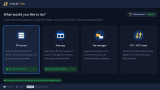
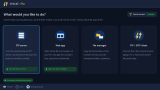
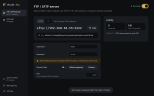
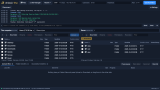
The start screen picks the mode. The FTP server shows its address and login on screen, lets you change the user, password and port, and shows clients and speed live. The web app opens in a browser on a PC or phone to browse, upload, download, copy, move, rename and delete. The file manager has two panes over internal storage, Homebrew, USB and extended storage. The client reaches a PC or NAS over FTP or SFTP, with saved sites, resume and up to 30 transfers at once. The servers keep running while you use another mode.
The same app runs on Windows, Mac, Linux, Android and a Switch with hbmenu, and Quick connect lists the other copies on your network. Pick one, confirm the 4-digit code on its screen, and you're browsing its files.
It needs ShadowMountPlus, and an ELF loader on port 9021 when it starts: it sends the Lapy helper there to reach the console's full storage. Copy the PPSA96024 folder from the zip to /data/homebrew/. The folder and every file in it must be 777, or the console won't start it. The developer lists firmware 13.60.
At start it asks chiral-ftp.com for a newer version, sending the platform, the version and a random ID, and can update itself. Settings turns the check off. The web app has no login, and the FTP server starts with a default one, so change it. Settings and saved sites are kept in /data/chiral-ftp.
Controls:
- Cross opens, Circle goes back, Options opens the menu
- Square marks, Triangle copies the marked items
- R1 switches sides, the touchpad shows transfers
Release notes
v1.2 · Chiral-FTP 1.2 · Nov 3, 2026
chiral-ftp 1.2
 
chiral-ftp now runs on Android: phones, tablets, foldables and
Android TV, from one APK. That makes six platforms: Windows, Mac, Linux,
Android, Nintendo Switch and PS5. All of them find each other with Quick
connect, and from this version on, all of them update themselves.
Thank you: chiral-ftp has already passed 1,500 downloads. Every bug
report, idea and kind word since 1.0 has gone into making it better.
New: chiral-ftp.com
chiral-ftp now has its own website, chiral-ftp.com,
with the downloads for every platform in one place
(chiral-ftp.com/download).
New: Android phones, tablets and foldables
| Files | Client | Quick connect |
|---|---|---|
| The file manager on an Android device | An Android device and a NAS, both in Movies | A TV, a Switch and a PS5 nearby, and where to get chiral-ftp |
- Everything the other versions do: the SFTP or FTP server, the web app, the file manager and the FTP / SFTP client with saved sites, resume and up to 30 transfers at once.
- Made for a touch screen: tabs for Files, Client, Server, Quick connect, Transfers and Settings. Tap to open, long-press to mark, drag to scroll.
- Fits any screen and follows it as it changes. A phone shows one pane at a time. An unfolded foldable or a tablet shows two side by side. A cover screen gets a compact layout. Sideways, the tabs slide in from the edge. Folding, unfolding or turning the phone keeps your folders, marks and scroll positions.
- File manager: cut, copy and paste, rename, delete, new folder, mark all, and copy to the other side.
- Open files in other apps: Open, Open with… and Share hand a file to the app that opens it. An APK opens in the system installer.
- Sort by name (A–Z or Z–A), date (newest or oldest first), size (largest or smallest first) or type, in the file manager and the client. The choice is remembered.
- SFTP server (encrypted) or FTP, on the same screen, with the server's key fingerprint so you can check it when you connect.
- Back goes up a folder. On the first screen it goes to the home screen, and the servers keep running.
- chiral-ftp asks for All files access so it can manage and share your whole storage. Without it, it still works, with only what Android lets any app see.
- Android 8.0 or later, on ARM (64- and 32-bit) and x86_64.
New: Android TV
| The start screen | The file manager, with the remote's buttons |
|---|---|
| chiral-ftp's start screen on Android TV | Two folders side by side, one file marked |
- The TV interface, the same one the PS5 and the Switch have, used with the remote.
- The remote's buttons: the D-pad moves, OK opens, Back goes back, hold OK opens the menu (settings, the message log, About), and Play/Pause marks. The bottom bar shows the remote's buttons, or a gamepad's (A, B, X, Y) as soon as you use one.
- Back on the start screen goes to the TV's home screen; the servers keep running.
New: updates, on every platform
- chiral-ftp tells you when there's a new version, on all six platforms. At startup it asks chiral-ftp.com, and when there's a newer one it offers Update, Not now (asks again in 7 days) or **Skip this version**.
- Update installs it for you, with a progress bar:
- Windows, Mac and Linux: the
.exe, the.appor the AppImage is replaced where it is, and chiral-ftp restarts on the new version. - Android: the new APK goes to Android's installer, as when you install one by hand. Your settings stay.
- Nintendo Switch: the
.nroyou started is replaced, under the same name. chiral-ftp then closes; open it again from hbmenu. - PS5: chiral-ftp closes, the new version is put in its folder, and a notification says when it's ready to open. It needs the payload loader on port 9021, like chiral-ftp itself. With more than one copy installed, it says so and changes none of them.
- Where a copy can't update itself, you get the download page instead: a folder this account can't change, a Mac app opened straight from the disk image or from Downloads, or a Switch
.nrostarted without hbmenu. - Settings > Check for updates turns the startup check off, and **Check now** asks straight away, on computers, phones, TVs and consoles. The check sends the platform, the version and a random ID made on first start, to count devices; nothing else. Test builds (
-beta,-alpha,-dev) never check. - On the Switch, the console's clock must be right: the secure connection checks dates. When the check fails, the message log shows the console's date and where to set it.
- Copies of 1.1 and earlier don't have this yet: download 1.2 once by hand, and it takes care of the next ones.
Mac: a disk image
- The Mac download is now
chiral-ftp-1.2.dmg: open it and drag chiral-ftp onto Applications, as the window shows. The window also says how to open an app that Apple hasn't checked (**System Settings > Privacy & Security > Open Anyway**).
Everywhere
| On the PS5 | On a computer |
|---|---|
| Quick connect on the PS5, with the download links | Quick connect on a computer, with the download links |
- Quick connect shows where to get chiral-ftp for your other devices: chiral-ftp.com/download and the GitHub releases.
- Android devices show up in Quick connect with a phone or a TV icon, as "Android" and "Android TV".
- About lists every platform chiral-ftp runs on, with links to chiral-ftp.com and the GitHub repository.
Later: the app stores
If there's enough demand, a signed Android version will come to the **Google
Play Store**, and a signed Mac version to the Mac App Store. Until then,
the downloads here are unsigned: the Install steps below say how to open
them the first time.
For developers: every platform builds on GitHub
- Each platform has its own GitHub Actions workflow: Windows, Mac, Linux (x86_64 and ARM64 AppImages), Android, Switch and PS5. Every push to
devbuilds all of them, and each run's page has its file to download. Run one by hand with a version, such as1.2-beta, for a test build (a test version never asks for updates). - New Release builds the platforms you tick and, only if every one of them succeeds, tags the version and makes its release: the files, the notes from this changelog and the checksums. Run again for an existing version, it adds the ticked platforms' files to that release.
- Latest version keeps
latest_version.json, each platform's newest file, up to date for the website.
Install
PS5
- Download
chiral-ftp-ps5-1.2.zipbelow and unpack it: it contains the folderPPSA96024. - Copy that folder to
/data/homebrew/PPSA96024on the PS5. - Make sure the folder and every file in it are 777 (the zip stores them that way, but some FTP clients don't keep it), then start Chiral-FTP from the dashboard.
Updating: chiral-ftp 1.2 and later offer new versions themselves. From an
older one, close chiral-ftp first, then replace the folder. Your settings and
saved sites stay in /data/chiral-ftp.
Nintendo Switch
- Download
chiral-ftp.nrobelow. - Copy it into
/switchon your SD card. - Start it from hbmenu. For the whole console's memory, hold R while launching a game and pick chiral-ftp from the menu that opens; starting it from the album works too, with less memory.
Updating: chiral-ftp 1.2 and later offer new versions themselves. From an
older one, replace the .nro. Your settings and saved sites stay in/switch/chiral-ftp.
Android (Android 8 or later: phones, tablets, foldables and TVs)
- Download
chiral-ftp-1.2-android.apkbelow, on the device or to copy over to it. - Open it and install it, allowing installs from that source if Android asks.
Updating: chiral-ftp offers new versions itself, or install the new APK
over the old one. Your settings stay.
Mac (Apple silicon)
- Download
chiral-ftp-1.2.dmgbelow and open it. - Drag
chiral-ftp.apponto Applications and open it from there. (Opened straight from the disk image or from Downloads, it runs but can't update itself.) - The app isn't notarized by Apple, so the first time macOS says it can't check it: open System Settings > Privacy & Security and choose Open Anyway (or run `xattr -dr com.apple.quarantine /Applications/chiral-ftp.app` once).
Updating: chiral-ftp offers new versions itself. Your settings stay in~/Library/Application Support/chiral-ftp.
Linux (Ubuntu 22.04, Debian 12, Fedora 36 or newer, and others like them)
- Download
chiral-ftp-1.2-x86_64.AppImage(most PCs) orchiral-ftp-1.2-aarch64.AppImage(ARM computers, such as a Raspberry Pi 4 or 5 on 64-bit) below. - Make it executable (
chmod +x chiral-ftp-*.AppImage, or Properties > Allow executing as a program) and run it.
Updating: chiral-ftp 1.2 and later offer new versions themselves. From an
older one, replace the file. Your settings stay in ~/.local/share/chiral-ftp.
Windows (Windows 10 or 11)
- Download
chiral-ftp-1.2-windows-x64.exebelow (it runs on Windows on ARM PCs too, through Windows' own x64 emulation). - Run it; nothing needs installing. The program isn't signed, so the first time Windows SmartScreen says it doesn't recognise it: choose More info > Run anyway. When Windows Firewall asks, allow private networks, so that a console or phone can reach the server.
Updating: chiral-ftp 1.2 and later offer new versions themselves. From an
older one, replace the .exe. Your settings stay in %APPDATA%\chiral-ftp.
To keep everything on a USB stick instead, settings included, make a folder
named data next to the .exe: chiral-ftp then keeps its settings there.
Checksums
365e1bd7c7529c786681a4cb5e69af5961b961a82eedcd620ee22a3b60e4dfc2  chiral-ftp-1.2-aarch64.AppImage
6e6f20ae754f269bd8ede2359e94c60e49106490c23060d19811417bd47e7af2  chiral-ftp-1.2-android.apk
7af89a65b4ebb639b5cbed38589fd986317a2d1f9aa24430bf006da663252915  chiral-ftp-1.2-windows-x64.exe
e5783085059dc0ee8f4174e54269d2758165cf876e94c9303d1354a4dafdb762  chiral-ftp-1.2-x86_64.AppImage
bb373d6ec105e61abcfb072ef543e210cdbda23945675317147e77f897d7c309  chiral-ftp-1.2.dmg
725603652736190688cbd37fa99759d023507d4442a93b1744821f210c6f69f2  chiral-ftp-ps5-1.2.zip
2b4fa5adb4079c62fc03424d25cc8edb497ecab6c82b25031fc22d5f5e2795b8  chiral-ftp.nro
Made by Herbrax (Simo Hakim). Bugs and pull requests are welcome:
https://github.com/Herbrax/chiral-ftp/issues