
CD Player v1.1.2 by LoZazaMastro
Plays audio CDs from an external USB drive such as Apple's SuperDrive, with album art, lyrics, an equaliser and 161 visualisers
Install on your PS5
App folder (.zip): unzip PPSA98427.zip and copy the PPSA98427 folder to /data/homebrew/ on the PS5, over FTP or from a USB drive. Some apps also need their title ID added to etaHEN's app list: the release notes say.
Files
| File | Size | SHA-256 | |
|---|---|---|---|
| PPSA98427.zip | 15.9 MB | f394c3a8…837d | Download |
Screenshots
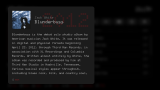
About CD Player
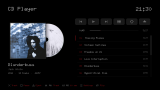
The PS5's own disc drive doesn't play audio CDs, so this reads them from an external USB optical drive. Apple's USB SuperDrive works, and other drives may, depending on their USB bridge and firmware. The album page shows a large cover, a spinning 3D disc and the track list. Album details and covers come from MusicBrainz and the Cover Art Archive, notes from Wikipedia and timed lyrics from LRCLIB.
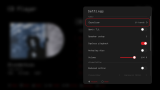
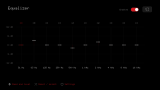
There's a ten-band equaliser, gapless playback, an optional stereo-to-7.1 upmix with a level for each of the eight speakers, 161 visualisers that move with the music, an OLED mode and 40 accent colours. Settings and the artwork cache are kept in /data/cdplayer-PPSA98427.
Copy the PPSA98427 folder to /data/homebrew/ so that /data/homebrew/PPSA98427/eboot.bin exists, then open CD Player from Media. Your homebrew environment may need an ELF loader on port 9021. Start the console with the drive empty and put the CD in after boot. If an older version takes up about 18 GB, delete it in the PS5's storage settings and install 1.1.2 again. The developer lists firmware 13.60.
- Square: play or pause
- L1 and R1: previous or next track
- L2 and R2: back or forward 10 seconds
- Triangle: eject
- Touchpad: full-screen visualiser, then R3 for lyrics
- Hold Options and press Circle: close the app
Release notes
v1.1.2 · CD Player 1.1.2 · Oct 23, 2026
Fixes the oversized storage reservation that made CD Player occupy about 18 GB on PS5. The app now reserves 256 MiB for its data instead of 16 GiB.
Tested on PS5 firmware 13.60.
Updating an existing installation: remove CD Player through the PS5 storage settings, then install this release again to reclaim the reserved space. Replacing the files alone does not shrink the old allocation. Reinstallation may reset settings and cached artwork.
By LoZazaMastro.