

BlueBird v1.0.0 by jpemendonca
PS5 game sound on Bluetooth speakers and headphones through a USB Bluetooth adapter, leaving the console's own Bluetooth to the DualSense
Install on your PS5
Payload: start elfldr 0.25 or newer on the PS5 first. It listens on port 9021. Then press Send to PS5 beside the file under Files, on a computer or phone on the same network. elfldr downloads the payload and runs it, so the PS5 needs to be online.
Files
| File | Size | SHA-256 | |
|---|---|---|---|
| BlueBird.elf | 594 KB | bcedf725…a13f | Send to PS5 Download |
Screenshots

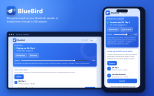

About BlueBird
BlueBird runs its own Bluetooth host on a separate USB adapter, so the controller keeps the console's radio. It captures the console's main sound, encodes it as SBC at 48 kHz and streams it over A2DP. When the link gets weak it lowers the quality for a moment and keeps playing.
Send BlueBird.elf to your payload loader and plug in the adapter. A tile in the Media tab opens the dashboard, which is also at http://<PS5-IP>:8120 on a phone. Put the speaker or headphones in pairing mode, press Search, then Connect. After that it connects again by itself. The dashboard is in English, Portuguese, Spanish, French, German, Russian and Japanese.
The developer lists the TP-Link UB500 (Realtek RTL8761B), whose firmware BlueBird carries, and expects generic CSR 4.0 sticks to work with none. Other Realtek chips and LE-only sticks don't work. If you also run OmniPad CE, each one needs its own adapter.
The TV keeps playing too, and sounds that games send to the controller's speaker stay there. Expect about 150 to 250 ms of delay. Send report on the Help page uploads the log and diagnostics to the developer's server and gives you a code to quote. Nothing is sent unless you press it.
Release notes
v1.0.0 · BlueBird 1.0.0: PS5 sound on Bluetooth speakers and headphones · Nov 13, 2026
The first release of BlueBird: your PS5's game sound on a Bluetooth speaker or headphones, through a plain USB Bluetooth adapter. The console's own Bluetooth stays with the DualSense.
Highlights
- A2DP to speakers and headphones, with BlueBird's own Bluetooth host on a USB adapter. SBC at 48 kHz, quality up to 53, adjusted on the fly when the link gets weak.
- Realtek RTL8761B firmware built in. A TP-Link UB500 gets its patch from BlueBird, whatever its USB vendor id. Generic "CSR 4.0" dongles work without firmware.
- Pair once. BlueBird calls the last device by itself, and a paired device that is switched on can connect to the PS5 on its own.
- A light blue dashboard in the Media tab or on your phone (
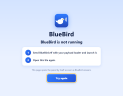
http://<PS5_IP>:8120), in English, Português, Español, Français, Deutsch, Русский and 日本語. Opened while BlueBird is not running, the tile explains how to start it. - Notifications for every step: running, adapter found and ready, connecting, paired, playing, disconnected.
- Send report from the dashboard, with a short code to quote, and detailed logs that never grow past about 2 MB.
Tested on a PS5
- TP-Link UB500 adapter, with the RTL8761B firmware loaded by BlueBird.
- A Bluetooth speaker and Samsung Galaxy Buds2 playing game sound.
- The dashboard on the console and on a phone.
Good to know
The DualSense's speaker keeps playing the sounds games send to it. To silence it: Settings › Accessories › Controllers › Volume of controller speaker.
Install
- Download
BlueBird.elfbelow. - Send it to your payload loader and launch it.
- Plug in a USB Bluetooth adapter and open the BlueBird tile in the Media tab.
Guide in Portuguese: docs/COMECE_AQUI.md.
Files
| File | SHA-256 |
|---|---|
| BlueBird.elf | bcedf725dc07f28f7195d197f01723f54ac6b329e6a0e39872b61b136a20a13f |
Licences
BlueBird is GPL-3.0-or-later. It builds on OmniPad CE and HearBridge-PS5 by X-F1REBALL-X. The embedded Realtek firmware comes from linux-firmware under LICENCE.rtlwifi_firmware.txt, attached here.