

Bible Reader v0.2.1 by Yahballon
The whole Bible offline in English, German, French, Spanish and Russian, with search, bookmarks and verses read aloud by voices that run on the console
Install on your PS5
App folder (.zip): unzip PPSA99793.zip and copy the PPSA99793 folder to /data/homebrew/ on the PS5, over FTP or from a USB drive. Some apps also need their title ID added to etaHEN's app list: the release notes say.
Files
| File | Size | SHA-256 | |
|---|---|---|---|
| PPSA99793.zip | 312.6 MB | f2c0a181…38ec | Download |
Screenshots
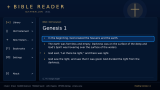
About Bible Reader
All 66 books in five public domain translations: the World English Bible (British Edition), the Luther Bible of 1912, Louis Segond 1910, Reina-Valera 1909 and the Russian Synodal Bible. Menus, book names and the search keyboard follow the language you pick. There's a book picker for the Old and New Testament, font sizes, two themes, a Daily Verse panel, search and bookmarks, and it remembers where you were.
Press Cross on a verse and it's read aloud from there, on through the next chapters and books, with each word lit up in yellow as it's spoken. The voices are Piper neural voices, one per language, and the speech is made on the console with no internet. The author says the word highlighting is an approximation with these voices. Voice style can also be set to Classic, which uses eSpeak NG, and there's an English retro computer voice.
Controls:
- Cross selects or starts reading, Circle goes back or stops the reading
- Square bookmarks a verse, Triangle opens search and R2 runs it
- L1 and R1 change chapter, L2 opens the Daily Verse, Options opens settings
The download is about 330 MB, because the voices and translations are all inside. Copy the PPSA99793 folder to /data/homebrew/. Settings and bookmarks are kept in /data/BibleReader/settings.txt.
Release notes
v0.2.1 · Bible Reader v0.2.1 — Offline Native Piper TTS · Oct 18, 2026
Bible Reader v0.2.1 — Russian voice repair
- Fixes the PS5 Russian reading error Voice unavailable (see BibleReader log) reported on v0.2.0.
- Corrects an out-of-bounds eSpeak fallback profile table: the fifth native-language slot now resolves to
zle/ruinstead of an unrelated file path. - Centralizes language-to-eSpeak profile mapping so asset validation and actual voice selection always use identical profile names.
- Adds a regression test for all five classic/fallback voices and an explicit eSpeak
SetVoiceByNamesmoke test with the bundled offline assets. - Keeps native Piper Denis Medium, five-language neural synthesis, Retro TTS, karaoke word highlighting, full offline Bible, and other language support unchanged.