

BETA NEON CALC v1.0.0-beta.1 by Sunix
Calculator payload with a big-screen page in the PS5 browser and a shortcut of its own in the Media tab
Install on your PS5
Payload: start elfldr 0.25 or newer on the PS5 first. It listens on port 9021. Then press Send to PS5 beside the file under Files, on a computer or phone on the same network. elfldr downloads the payload and runs it, so the PS5 needs to be online.
Files
| File | Size | SHA-256 | |
|---|---|---|---|
| BETA-NEON-CALC-v1-ICONFIX.elf | 177 KB | 9f129cca…0011 | Send to PS5 Download |
Screenshots
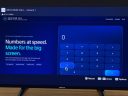


About BETA NEON CALC
Add, subtract, multiply and divide, with percent, sign change, decimals and clear, on a dark page sized for the TV. Move around it with the D-pad or a keyboard.
With an ELF loader running, import the .elf as a new payload in Payload Manager, run it once and wait for the notification that the launcher is registered. BETA NEON CALC then shows in the Media tab and opens the page from the console itself. Keep the payload running while you use it. It takes port 8888, or the next free one up to 8900.
The author calls it a beta and says it can behave differently from one firmware or loader to another.
Release notes
v1.0.0-beta.1 · BETA NEON CALC — v1.0.0-beta.1 · Nov 3, 2026
BETA NEON CALC — Version 1
A PS5 payload that gives you a polished, big-screen calculator and a dedicated launcher in the PS5 Media tab. The beta screenshots in the repository show the calculator running in the PS5 browser and its home-screen icon.
Highlights
- PS5-inspired dark interface with crisp, readable type and blue accents
- Four operations, percentage, sign change, decimals, and clear
- D-pad/keyboard navigation
- Local browser shortcut registered as BETA NEON CALC in Media
- Automatic port selection from
8888to8900if another payload is using the default
Install
- Open Payload Manager while a compatible PS5 ELF loader is active.
- Import
BETA-NEON-CALC-v1-ICONFIX.elfas a new payload. - Run it once and wait for the launcher registration notification.
- Open the Media tab and select BETA NEON CALC. Keep the payload running while using the calculator.
Assets
BETA-NEON-CALC-v1-ICONFIX.elf— PS5 payloadBETA-NEON-CALC-v1-source.zip— source, assets, and build files
This is a beta ELF payload, not a PKG or standalone native application. Firmware/loader compatibility may vary. If launcher registration reports an error, keep the stage and hexadecimal code for troubleshooting.
Created by Sunix · Source repository · GPL-3.0