

ArchiveFetch v1.0.1 by 4beemaster
Download manager for Archive.org file lists, run as a payload with a web interface on port 8890, and companion apps for Windows and Android
Install on your PS5
Payload: start elfldr 0.25 or newer on the PS5 first. It listens on port 9021. Then press Send to PS5 beside the file under Files, on a computer or phone on the same network. elfldr downloads the payload and runs it, so the PS5 needs to be online.
Files
| File | Size | SHA-256 | |
|---|---|---|---|
| ArchiveFetch-1.0.1.elf | 19.5 MB | 3f4c8dd2…d1a9 | Send to PS5 Download |
Screenshots
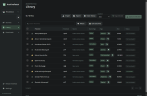
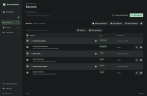

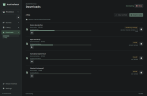
About ArchiveFetch
Add an Archive.org item address, or its _files.xml list, and ArchiveFetch reads the files into one library you can search, filter, sort, tag and favourite. Sources can be grouped into collections that share tags. No sources come with it: you add your own Archive.org addresses. It doesn't install or start games.
Downloads run one file at a time, with up to eight connections for files of 32 MiB or more, and each file can be paused and resumed while the rest of the queue goes on. Finished files are compared with the size and SHA-1 or MD5 that Archive.org lists, and files without either can't be queued. Tags send downloads to named folders, and zip, 7z, rar and tar archives can be extracted after download. Restricted files need your own Archive.org IA-S3 keys, which the PS5 keeps in a plain, unencrypted file if you ask it to remember them.
Send the ArchiveFetch .elf to the ELF loader on port 9021 and wait for its notification. Then open the ArchiveFetch tile in Media, or http://<PS5 IP>:8890/ from another device, where a QR code also links to it. Load it again after a reboot, or start it from Payload Manager. Extracting on the PS5 needs the ELF loader still running on port 9021. The developer lists firmware 13.60.
The Windows and Android apps on the developer's release page can run the console's library and downloads from a PC or phone, and install or update the payload. The web interface only answers devices on your home network unless you allow outside connections with a password. It runs over plain HTTP, so the developer suggests a VPN for use away from home.
Release notes
v1.0.1 · ArchiveFetch 1.0.1 · Nov 16, 2026
ArchiveFetch 1.0.1
Features
- Automatically check for updates when the app opens or reconnects. Android also checks when returning to the app. Downloads and installation still require confirmation.
- Remember the Include beta builds setting across restarts and updates.
- Skip an update notification without hiding newer releases or manual update checks.
- View release notes in a scrollable popup.
- Show complete download and export paths, including long paths.
- Open folder pickers at the current location, with appropriate storage roots for new folders.
- Add a separate Configure Download Locations dialog and clearer tag-based download routing settings.
- Access logs and enable persistent Debug logging from Settings.
Bug fixes
- Android: Fix interface reloads timing out with a populated library.
- Android: Recover an expired local-service session and retry the request.
- PS5: Show an error for unavailable saved folders without reusing a stale folder selection.