

Arcade v0.2.1 by zomavich
MAME-based arcade emulator for the PS5 with a controller-first library, save states per game and profile, and automatic screen rotation
Install on your PS5
App folder (.zip): unzip Arcade-v0.2.1-PS5.zip and copy the PPSA99984 folder to /data/homebrew/ on the PS5, over FTP or from a USB drive. Some apps also need their title ID added to etaHEN's app list: the release notes say.
Files
| File | Size | SHA-256 | |
|---|---|---|---|
| Arcade-v0.2.1-PS5.zip | 119.1 MB | 81cf6cd9…51e2 | Download |
Screenshots
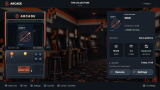
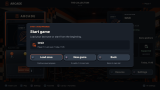
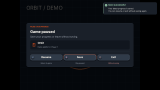
About Arcade
Arcade is built on MAME with a frontend of its own. The library shows each game's maker, year, hardware, region, players and how well it runs, with favourites and settings per game. Games made for rotated screens are turned the right way by themselves, and you can adjust that by hand.
Progress is saved per game and per profile. Starting a game that has a save asks whether to load it or start a new game. Saving from the pause menu keeps the game paused, and Exit doesn't save by itself.
No games or BIOS files are included. Put your own in /data/arcade/roms and /data/arcade/bios. To install, copy the PPSA99984 folder from the zip to /data/homebrew/.
- L3: insert a credit
- Options or R3: Start
- Touchpad: pause menu
- Square in the library: that game's settings
The author calls it a development prerelease. OpenGL is the default renderer and Vulkan is experimental. The developer lists firmware 11.40.
Release notes
v0.2.1 · Arcade v0.2.1 — First Public Preview · Oct 28, 2026
First public release
Arcade Gallery is a native PS5 arcade emulator by zomavich, built around a custom controller-first frontend and MAME. No games or BIOS files are included.
Features
- Cabinet-style library, favorites, game information cards and indexed cover lookup.
- Per-game and per-profile save states, with Load save or New game choices.
- Separate Resume, Save and Exit controls with timed save-result notifications.
- Automatic orientation for games that use rotated displays.
- Main-hall music with volume, mute and accessibility controls.
- Personal build paths removed from diagnostic strings.
Installation
Download Arcade-v0.2.1-PS5.zip and SHA256SUMS. Extract and copy the complete PPSA99984 folder to /data/homebrew/ using your existing PS5 homebrew setup, or install it through ProsperoStore once the listing is approved. Keep your existing content, settings and saves. Console content version is 01.000.001.
Validation and limitations
All 13 automated app test suites passed. Native host graphics, audio and gameplay smoke checks passed. Package hashes, ZIP integrity, source/archive metadata, icon format and native executable alignment were verified.
This is a development prerelease. OpenGL is the default; Vulkan remains experimental. Compiled driver coverage does not guarantee playability. Fresh-install shell media discovery and final TV home-screen playback remain unconfirmed. Existing installations with absent artwork/audio references can require a separate metadata refresh; the app package does not automatically modify system databases.