
Afterglow v01.000.006 by DevvNirvana
Internet radio in 17 genres, your own music from USB, and visuals that move with the beat
Install on your PS5
App folder (.zip): unzip PPSA47770.zip and copy the PPSA47770 folder to /data/homebrew/ on the PS5, over FTP or from a USB drive. Some apps also need their title ID added to etaHEN's app list: the release notes say.
Files
| File | Size | SHA-256 | |
|---|---|---|---|
| PPSA47770.zip | 40.0 MB | 3c6d57ab…e47f | Download |
Screenshots

About Afterglow
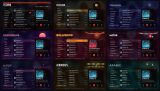
The stations are all public streams, from Techno and Drum & Bass to Bollywood, K-Pop and Arabic. Every genre restyles the whole screen. Station logos and album art come up as songs play, with covers looked up in MusicBrainz, and you can keep the songs you like.
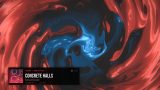
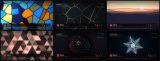
The visuals are 56 scenes drawn with OpenGL shaders that lock to the tempo. Auto-VJ cuts between them at the end of a phrase.
My Music plays MP3, AAC, Ogg Vorbis and Opus from a USB drive, with tags and covers. Hold Triangle to type commands like "play bollywood 90s" or "next".
The developer lists firmware 13.60.
The visuals are 56 scenes drawn with OpenGL shaders that lock to the tempo. Auto-VJ cuts between them at the end of a phrase.
My Music plays MP3, AAC, Ogg Vorbis and Opus from a USB drive, with tags and covers. Hold Triangle to type commands like "play bollywood 90s" or "next".
The developer lists firmware 13.60.
Release notes
v01.000.006 · Afterglow 1.0.6 · Oct 16, 2026
Afterglow 1.0.6: an internet radio and music visualizer for PS5.
- 222 stations in 17 genres, including new Latin, K-Pop, Afrobeats and Arabic
- 20 new Calm and Gallery visuals, with live BPM sync
- Ogg Vorbis and Opus streams, station logos, crossfade between stations
- My Music: play your own songs from a USB drive
- Voice-style command box (hold Triangle)
Install: unzip PPSA47770.zip so the PPSA47770 folder is at the top, or install through the catalog.