

wiliwili v1.6.0 by xfangfang
Third-party Bilibili client made for controllers, with danmaku, comments and live streams
Install on your PS4
Package (.pkg): with GoldHEN running, copy wiliwili-PS4.pkg to the root of a USB drive (exFAT or FAT32), plug it into the PS4 and install it from Settings › Debug Settings › Game › Package Installer.
From a computer or phone: give this link to a remote package sender (GoldHEN's Remote Package Install, or Remote Package Installer on port 12800):
https://store.brewology.com/dl/6496/wiliwili-PS4.pkg
Files
| File | Size | SHA-256 | |
|---|---|---|---|
| wiliwili-PS4.pkg | 71.2 MB | d9f089be…ffba | Download |
Screenshots
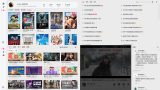
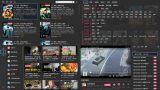
About wiliwili
Search covers trending topics, videos, anime and films, and there's a filter page for films and series. There's a feed from the uploaders you follow and a page of live streams. Videos, anime, films, documentaries and variety shows play with danmaku and comments.
The interface is in Simplified and Traditional Chinese, Japanese, Korean and English, with light and dark themes. On the PS4 video is decoded in software only, and the author says 4K at 60fps needs the low quality decoding option switched on in settings. Thumbnails while scrubbing don't work on the PS4 yet.
Release notes
v1.6.0 · wiliwili v1.6.0 · Apr 25, 2026
💡macOS 和 Windows 分别推出了适合 老系统/老设备 的版本,对于新用户,请先运行默认版,如有问题再尝试这些专门适配版。
相关链接 :
来 wiki 看看 wiliwili 还能玩出什么花样来: https://github.com/xfangfang/wiliwili/wiki
SteamDeck 防锁屏插件: https://github.com/xfangfang/DeckyInhibitScreenSaver
Xbox 版暂停维护:https://github.com/xfangfang/wiliwili/issues/468#issuecomment-3817713715
v1.6.0 更新说明 :
- 【修复】非登录用户无法获取视频链接
- 【修复】搜索页偶现报错
- 【修复】无法获取直播子分区列表
- 【修复】部分情况下无法获取到用户的登录状态,感谢 @ WsureDev
- 【修复】部分情况下 DLNA 投屏崩溃,感谢@ abfactor
- 【优化】移除不支持显示的搜索结果(如:课程)
- 【优化】播放器TV模式下进度条选中拖拽更丝滑 (播放器TV模式入口:界面设置 -> 界面风格)
- 【新增】播放器TV模式下,OSD隐藏时支持左右方向键调整进度
- 【新增】进度条拖拽时显示缩略图(PSV & PS4 暂不支持)
- 【新增】支持通过修改配置文件更换应用主题色 (见 wiki -> 自定义应用主题色)
- 【新增】播放器应用内全屏时自动窗口全屏(PC Only,入口:界面设置 -> 窗口)
- 【新增】进入播放页后播放器自动全屏(入口:播放设置 -> 其他设置)
- 【其他】更新 flatpak 的 runtime,更新 fmt 依赖库,感谢 @dragonflylee
- 【隐藏功能】进入分P视频时,在历史进度弹出时按弹幕快捷键可以跳转进度
Change log:
- [Fixed] non-logged-in users cannot obtain video links
- [Fixed] Occasional errors on search page
- [Fixed] Failed to fetch live streaming sub-section list
- [Fixed] User login status undetectable in some cases. Thanks to @WsureDev
- [Fixed] DLNA crashes in some cases. Thanks to @abfactor
- [Improved] Remove unsupported search results (e.g., courses)
- [Improved] Smoother progress bar dragging in player's TV mode
- [New] In player's TV mode, adjust progress with arrow keys when OSD is hidden
- [New] Show thumbnails when dragging progress bar
- [New] Change app theme color via config file (see wiki)
- [New] Auto full-screen window when player is full-screen in-app (PC only, go to Interface Settings -> Window)
- [New] Player auto full-screen upon entering playback page (go to Playback Settings -> Other Settings)
- [Others] Updated the runtime of flatpak and fmt library. Thanks to @dragonflylee
Please refer to the GitHub release page for detailed information.