

tvhp v0.3 by ps4-homebrew-dev
Tvheadend client: live TV, the programme guide and recordings over HTSP
Install on your PS4
Package (.pkg): with GoldHEN running, copy IV0000-BREW04328_00-TVHP000000000000.pkg to the root of a USB drive (exFAT or FAT32), plug it into the PS4 and install it from Settings › Debug Settings › Game › Package Installer.
From a computer or phone: give this link to a remote package sender (GoldHEN's Remote Package Install, or Remote Package Installer on port 12800):
https://store.brewology.com/dl/11537/IV0000-BREW04328_00-TVHP000000000000.pkg
Files
| File | Size | SHA-256 | |
|---|---|---|---|
| IV0000-BREW04328_00-TVHP000000000000.pkg | 97.9 MB | ee0843ed…509c | Download |
Screenshots

About tvhp
Talks to the server directly, with no transcoding proxy in between. You need a Tvheadend server on your network with an HTSP user (the default port is 9982). Playing recordings needs HTSP version 8 or later, which Tvheadend 4.2 and newer have. Several servers can be saved. They're kept in /data/tvhp/tvhp.cfg.
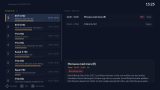
The channel list shows now and next with a progress bar, each channel has a full guide, and playback is full screen with channel zapping. Record any programme from the guide, then browse, play, cancel or delete recordings, including ones still being recorded.
- Cross: select, record, play or pause
- Circle: back
- Square: switch between the guide and recordings
- Triangle: delete a recording or server
- Options: add a server
- L1 / R1: page up and down
- Up / Down and Left / Right while playing: seek 5 minutes or 30 seconds
There's no series recording and no choice of audio track or subtitles, and channel icons aren't shown yet.
The channel list shows now and next with a progress bar, each channel has a full guide, and playback is full screen with channel zapping. Record any programme from the guide, then browse, play, cancel or delete recordings, including ones still being recorded.
- Cross: select, record, play or pause
- Circle: back
- Square: switch between the guide and recordings
- Triangle: delete a recording or server
- Options: add a server
- L1 / R1: page up and down
- Up / Down and Left / Right while playing: seek 5 minutes or 30 seconds
There's no series recording and no choice of audio track or subtitles, and channel icons aren't shown yet.