

TurboDL v1.0.0 by regalstreak
Background download manager for the PS4: up to 32 connections per file, resume after reboots, a web panel and .pkg auto-install
Install on your PS4
Package (.pkg): with GoldHEN running, copy TurboDL-1.0.0.pkg to the root of a USB drive (exFAT or FAT32), plug it into the PS4 and install it from Settings › Debug Settings › Game › Package Installer.
From a computer or phone: give this link to a remote package sender (GoldHEN's Remote Package Install, or Remote Package Installer on port 12800):
https://store.brewology.com/dl/16578/TurboDL-1.0.0.pkg
Files
| File | Size | SHA-256 | |
|---|---|---|---|
| TurboDL-1.0.0.pkg | 6.3 MB | 8b7ecac0…2813 | Download |
Screenshots
About TurboDL
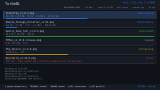
Downloads files from links you add, splitting each one into 16 MB pieces fetched over 1 to 32 connections (12 by default), with several downloads at once (4 by default, up to 8). Progress is saved every few seconds, so a download carries on after a pause, a crash or a reboot. Finished .pkg files can install themselves through the system installer, and can be deleted afterwards.
The download engine runs as a background service, so it keeps going while you play. On first start the app installs that service into the system partition (/system/vsh/app/TRBD00002), the way Itemzflow does, and starts it. After a reboot, open TurboDL once to start it again. If the service won't start, the app downloads by itself and has to stay open.
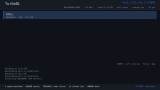
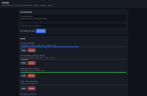
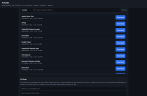
Add links from a phone or PC at http://<PS4 IP>:8080, several at once, and pause, resume, retry or remove them there. Downloads that need a login can use a cookie per site, sent only to that site. A catalogue tab on the TV and in the web panel reads list files you put on the console yourself. None come with it. The PS4 shows a notification at 50% and when a download finishes.
It needs GoldHEN, and the developer lists firmware 12.02.
- Cross: pause, resume or retry
- Triangle: install the selected finished .pkg
- Square twice: remove a download and delete its file
- L1 / R1: fewer or more connections per download
- L2 / R2: fewer or more downloads at once
- Options: switch between downloads and the catalogue
Release notes
v1.0.0 · TurboDL 1.0.0 · Oct 14, 2026
TurboDL 1.0.0 — a multi-connection, resumable download manager and installer for jailbroken PS4 (GoldHEN).
Download
TurboDL-1.0.0.pkg — install it with GoldHEN's package installer (USB, /data/pkg, or any remote pkg installer). Requires GoldHEN; tested on firmware 12.02.
Highlights
- Fast, parallel, resumable — up to 32 connections per file (16 MB segments via HTTP Range), up to 8 files at once (default 4), and per-segment progress saved every few seconds so pause / close / crash / reboot all resume.
- Background service — the engine runs as a daemon (
PKDL00002) that keeps downloading while you play, with the web panel always up. - Auto-install — finished
.pkgfiles are installed through the system installer (BGFT); optionally deleted afterwards. - Web panel at
http://<ps4-ip>:8080— add links in bulk, pause/resume/retry/remove, per-site cookies, settings, catalog with search that loads as you scroll, and a proper mobile layout. - TV UI — progress, speed and ETA per file, spinner + status during startup/updates, and a catalog tab with on-screen-keyboard search.
- Notifications — a popup at 50% and on completion (step configurable).
- Thousands of connections? No. 12 per file is plenty; the panel warns when parallel × connections gets large.
Notes
- TurboDL is a generic HTTP download manager: it ships no content, links, catalogs or credentials. Add your own lists to
/user/data/turbodl/catalogs/<TYPE>.json(FPKGi JSON format) and your own site cookies in the web panel. - Upgrading from the old pre-rename layout: move
/user/data/pkgdlto/user/data/turbodlonce over FTP (see the README).