
PS4Load v0.5.0 by bucanero
Development helper: send an eboot.bin from your computer over the network and it runs on the PS4
Install on your PS4
Package (.pkg): with GoldHEN running, copy IV0000-LOAD00044_00-SDL2GLES20000000.pkg to the root of a USB drive (exFAT or FAT32), plug it into the PS4 and install it from Settings › Debug Settings › Game › Package Installer.
From a computer or phone: give this link to a remote package sender (GoldHEN's Remote Package Install, or Remote Package Installer on port 12800):
https://store.brewology.com/dl/5928/IV0000-LOAD00044_00-SDL2GLES20000000.pkg
Files
| File | Size | SHA-256 | |
|---|---|---|---|
| IV0000-LOAD00044_00-SDL2GLES20000000.pkg | 6.3 MB | 00efee11…357e | Download |
Screenshots
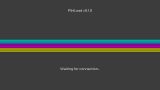
About PS4Load
Bucanero's PS4 version of the PS3load sample from PSL1GHT. Open the app on the console, then use the ps3load client on your computer to send it an eboot.bin and it runs. Send a .zip instead and it gets unpacked into /data/. If /data/ps4load/eboot.bin is there when the app starts, it runs that straight away.
Clients for Windows, Linux and macOS are in ps4load_clients.zip. Set the PS3LOAD variable to the console's address, for example PS3LOAD=tcp:192.168.1.20, then run ps3load with the path to your file.
Debug messages go out to UDP multicast 239.255.0.100 on port 30000. You can read them on your computer with socat.
Clients for Windows, Linux and macOS are in ps4load_clients.zip. Set the PS3LOAD variable to the console's address, for example PS3LOAD=tcp:192.168.1.20, then run ps3load with the path to your file.
Debug messages go out to UDP multicast 239.255.0.100 on port 30000. You can read them on your computer with socat.
Release notes
v0.5.0 · PS4Load v0.5.0 · May 14, 2022
Changes
- Add unZip feature (receive
.ZIParchives and unzip to/data/) - on-the-fly data decompression
- Auto-exec
/data/ps4load/eboot.binif found - Add PSL1GHT scroller