

PS4 Web Audio v1.1.1 by vypr
Streams the PS4's game sound to web browsers on your network, so a phone, tablet or PC can play it through its speakers or Bluetooth headphones
Install on your PS4
Package (.pkg): with GoldHEN running, copy PS4-Web-Audio.pkg to the root of a USB drive (exFAT or FAT32), plug it into the PS4 and install it from Settings › Debug Settings › Game › Package Installer.
From a computer or phone: give this link to a remote package sender (GoldHEN's Remote Package Install, or Remote Package Installer on port 12800):
https://store.brewology.com/dl/16458/PS4-Web-Audio.pkg
Files
| File | Size | SHA-256 | |
|---|---|---|---|
| PS4-Web-Audio.pkg | 6.3 MB | b737fbd6…e514 | Download |
Screenshots
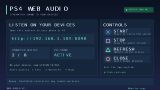
About PS4 Web Audio
The app starts an audio server on the console. On a PC, phone or tablet on the same network, open http://<PS4 IP>:8098/ and press Listen to PS4. Up to eight devices can listen at once, each with its own volume and quality: Fastest (24 kHz mono, 16-bit), Balanced (48 kHz stereo, 16-bit) or Highest Quality (48 kHz stereo, 32-bit float). The page picks iPhone, Android or desktop settings by itself and has a network test tone. Headphones paired with the phone or PC work this way with no pairing to the PS4.
The streaming payload is inside the package, and the app sends it through GoldHEN's payload server. If the server doesn't start, turn the payload server on (port 9090) and press Cross to retry.
- Cross: start or retry the audio server
- Square: stop it
- Triangle: refresh the status
- Circle: close the app (the server keeps running)
The page has no password and the sound goes over plain HTTP, so keep port 8098 off the internet. If you also run the older standalone payload, stop it first, as both use port 8098. The developer has run it on firmware 14.00 with GoldHEN and expects others to work. Parts come from XB-01's PS4 Bluetooth Audio.
Release notes
v1.1.1 · PS4 Web Audio v1.1.1 — Firmware Compatibility Update · Nov 8, 2026
PS4 Web Audio v1.1.1
Stream PS4 game audio directly to PCs, phones, and tablets through your local network.
Features
- Native PS4 home-screen application with simple controls.
- Three audio modes: Fastest, Balanced, and Highest Quality.
- Up to 8 simultaneous listeners.
- Browser support for PC, iPhone, and Android.
- Independent quality and volume controls.
- Automatic device detection.
- No Background edition.
Firmware Compatibility
Tested on PS4 firmware 14.00 with GoldHEN.
Other firmware versions may also work, but they have not yet been verified. Firmware 14.00 is not a strict stated requirement.
Installation
- Download
PS4-Web-Audio.pkg. - Install it using GoldHEN's Package Installer.
- Launch PS4 Web Audio.
- Open
http://YOUR-PS4-IP:8098/on your device. - Press Listen to PS4.
What's Changed in v1.1.1
- Updated firmware compatibility documentation.
- Audio engine and PS4 application remain unchanged from v1.1.0.
The full source code is available in the repository.
Full Changelog: https://github.com/vypr/ps4-web-audio/commits/v1.1.1