
PS4 AirPlay v1.12-rc13 by vivvd
AirPlay receiver for iPhone music, screen mirroring and Safari video, with no computer in between
Install on your PS4
Package (.pkg): with GoldHEN running, copy PS4-AirPlay-1.12-RC13.pkg to the root of a USB drive (exFAT or FAT32), plug it into the PS4 and install it from Settings › Debug Settings › Game › Package Installer.
From a computer or phone: give this link to a remote package sender (GoldHEN's Remote Package Install, or Remote Package Installer on port 12800):
https://store.brewology.com/dl/16563/PS4-AirPlay-1.12-RC13.pkg
Files
| File | Size | SHA-256 | |
|---|---|---|---|
| PS4-AirPlay-1.12-RC13.pkg | 14.0 MB | 30c1fecb…6c16 | Download |
Screenshots
About PS4 AirPlay
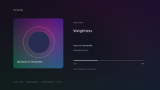
Put the PS4 and the iPhone on the same network, wait for Ready to play, then choose PS4 AirPlay on the phone. Music shows its artwork, title, artist, album and progress, and you control it from the phone. Screen Mirroring in Control Center mirrors the phone, and the AirPlay button inside Safari's video player sends the video itself to the PS4. The receiver is a patched UxPlay.
Direct video plays MP4 and HLS over HTTP and HTTPS. It's decoded in software, so high-bitrate and some fragmented streams can stutter. DRM video, HEVC and AV1 don't play, and the developer doesn't support YouTube. On some long videos the iPhone's timer stays at 00:00 and seeking doesn't work.
- Cross: pause or resume video
- Circle: stop video
- Square: diagnostics on or off
- Triangle, with diagnostics showing: colour bars
- Options: settings (language, and Disconnect AirPlay and exit)
Safari can open a diagnostics page on port 9080 of the PS4 (the address is on the TV), with a 12-second sample video, mirroring profiles and a report to download after a playback failure. Music, mirroring and Safari video have worked on the developer's PS4 on firmware 13.52, and they don't claim others. Every release is a pre-release, and the developer says the new settings and exit in 1.12-RC13 still have to be tried on a console.
Release notes
v1.12-rc13 · PS4 AirPlay 1.12-RC13 · Nov 2, 2026
English/Russian interface and safer session shutdown for PS4 AirPlay.
- English is now the default in the app and diagnostics page; Russian remains available. Change language from Options → Language or the diagnostics page. The selection is shared for the current app session.
- Options opens Settings. Choose Disconnect AirPlay and exit to close the receiver and return to the PS4 menu.
- Shutdown stops protocol callbacks before freeing video sessions, cancels/joins the direct player before destroying its core, and joins the HTTP thread even if it has already stopped itself.
- Discovery records use a 15-second lease, renewed every 5 seconds, plus zero-TTL goodbye messages on clean exit. iOS can still briefly retain a cached device or selected route after forced termination.
- Includes the accumulated Safari connection, encrypted control, verified HTTPS, FFmpeg video, and playback-info fixes since RC1. Direct video no longer uses Sony AvPlayer/Audiodec.
- GitHub documentation is now in English and describes the actual supported paths and limitations.
Validation: real core/FFmpeg integration under ASan/UBSan, active-playback shutdown with control socket EOF and closed listener, discovery TTL/renewal/goodbye, HTTP/HTTPS MP4/HLS/fMP4, pause/seek/stop, encrypted setup/pairing/FCUP, artwork/UI, 13 diagnostics tests, browser language switching, native PKG validation, and a clean source-archive rebuild.
This remains a pre-release: the RC13 Options/exit changes have not yet been tested on physical PS4 hardware. Earlier builds have played music, mirrored screens, and received Safari video on PS4 13.52. Some long videos still show 00:00 on iPhone; this is not claimed fixed. DRM, HEVC, AV1, and current YouTube compatibility are unsupported. Software decoding can stutter on demanding sources.
Install PS4-AirPlay-1.12-RC13.pkg over the previous version with HEN enabled. Title ID remains ARPL00001. Assets include the complete source/dependency archive and SHA256 checksums. Personal console reports are not included.