

Playtube v1.2.0 by LowganDev
A YouTube client for PS4 with GoldHEN, with SponsorBlock and optional sign-in.
Install on your PS4
Package (.pkg): with GoldHEN running, copy IV0001-PLTB00000_00-PLTB000000100000.pkg to the root of a USB drive (exFAT or FAT32), plug it into the PS4 and install it from Settings › Debug Settings › Game › Package Installer.
From a computer or phone: give this link to a remote package sender (GoldHEN's Remote Package Install, or Remote Package Installer on port 12800):
https://store.brewology.com/dl/27901/IV0001-PLTB00000_00-PLTB000000100000.pkg
Files
| File | Size | SHA-256 | |
|---|---|---|---|
| IV0001-PLTB00000_00-PLTB000000100000.pkg | 50.8 MB | df07c9f9…197e | Download |
Screenshots
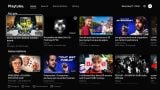
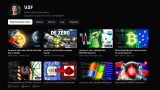
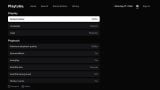

About Playtube
Watches YouTube on a PS4 with GoldHEN, made for the controller. It plays videos up to 1080p and live streams, with chapters, subtitles and Shorts played upright. Search takes suggestions and filters, and a pasted YouTube link plays straight away.
SponsorBlock skips sponsor segments, self-promotion, intros and outros. Dislike counts come from Return YouTube Dislike, and DeArrow can replace clickbait titles and thumbnails (off by default).
Signing in is optional. You enter a code on your phone, then get your recommendations, subscriptions, history, Watch Later and playlists. Each PS4 account gets its own profile.
- Copy the PKG to a USB drive or send it over FTP.
- Install it from GoldHEN > Debug Settings > Package Installer.
- Start Playtube from the home screen.
New versions show up at the top of the app's settings and download to /data/pkg. Install them the same way. The app keeps its settings in /data/Playtube/.
Playtube isn't affiliated with Google or YouTube.
Release notes
v1.2.0 · Playtube 1.2.0 · Nov 21, 2026
- The player is tidier: one row of round icons under the progress bar, the settings (quality, speed, volume, picture, audio track) in their own panel, the channel's picture beside its name.
- Added HDMI-CEC support: your TV's remote works in Playtube (arrows, OK, Back), if "Enable HDMI Device Link" is on in the PS4's settings and your TV is compatible.
- When YouTube's anti-bot check blocks the connection, Playtube says so (the block is temporary and signing in does not lift it) instead of YouTube's "sign in to confirm you're not a bot", and asks YouTube much less while it lasts.
- What plays next by itself is no longer a video already played since Playtube was started.
- Where you are in a video is sent to your YouTube history every 2 minutes instead of every 30 seconds.
- Fixed: the videos watched no longer went into the YouTube history (YouTube now asks for more than before).
- Fixed: a video whose stream YouTube cut on the way stopped as if it had ended; it now starts again from where it was.
- Fixed: when a video's page did not come, nothing played after it and the player closed; the page is now asked again.
- Fixed: some videos filled the log with the same warning.
Install: download IV0001-PLTB00000_00-PLTB000000100000.pkg, copy it to the console (USB drive or FTP) and install it from GoldHEN → Debug Settings → Package Installer. Playtube 1.0.0 and later also offer it at the top of their settings.
playtube-1.2.0-sources.tar is the corresponding source of the package (Playtube and every library it is built with).