

KeepAwake v1.5.0 by mortyzip
Payload that keeps the PS4 out of rest mode, with timers, a mode for transfers only and a control page for any browser
Install on your PS4
Payload (.bin): download keepawake_ps4_v1.5.0.bin under Files, then send it from a computer on the same network to your PS4's payload loader, such as GoldHEN's BinLoader on port 9090. A payload sender does it, or nc <PS4 address> 9090 < keepawake_ps4_v1.5.0.bin.
Files
| File | Size | SHA-256 | |
|---|---|---|---|
| keepawake_ps4_v1.5.0.bin | 54 KB | 25b14ea1…59f9 | Download |
Screenshots


About KeepAwake
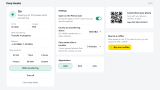
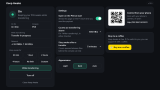
Send the PS4 payload to GoldHEN's BinLoader on port 9090. The control page opens in the console's browser, and the notification gives its address for other devices, http://<PS4 IP>:9031. From there you turn it off and on, pick a timer from 30 minutes to 4 hours or set your own up to 7 days, or scan a QR code to carry on from your phone. You can stop the page opening on the console each time it starts.
While transferring keeps the console awake only while the network is busy, such as a download, an FTP transfer or a package install, then lets it rest after a quiet spell. The defaults are 500 KB/s and 5 minutes, and both can be changed on the page. Rest mode suspends payloads, so long homebrew transfers don't get cut off. It can't tell a download from other traffic, so Remote Play counts too.
Off lets the console rest but leaves the payload running, so you can turn it back on from the page. Close it from the page, or by sending it again. There's no password, so keep port 9031 on your home network. Settings are saved in /data/keepawake.cfg.
Release notes
v1.5.0 · Oct 9, 2026
What's new
- Dark mode. Choose Light, Dark or Auto on the control page. Auto is light from 7 am to 7 pm and dark at night. The choice is saved per browser.
- The control page now adapts to the screen: one column on a phone, two on a tablet, three on a computer or TV, so it fits without scrolling.
- Websites open elsewhere on your network can no longer control it. Requests from another site are refused.
- The settings parser is stricter, and a slow or stuck connection now holds up the payload for 1 second instead of 2.
- PS4: fixed a case where an unrelated network error could be treated as "try again".
- Added a LICENSE (MIT) and screenshots.
Files
- PS5:
keepawake_ps5_v1.5.0.elf, send to the ELF loader on port 9021 - PS4:
keepawake_ps4_v1.5.0.bin, send to GoldHEN's BinLoader on port 9090
Open http://<console-ip>:9031 to control it. There's no password, so use it on a home network only.
Full Changelog: https://github.com/mortyzip/KeepAwake/commits/v1.5.0