
Game Language v1.00 by Jorditomasg
GoldHEN plugin and app that sets the language games start in, per game region, so a game that has your language doesn't fall back to English
Install on your PS4
Package (.pkg): with GoldHEN running, copy GameLanguage-v01.00.pkg to the root of a USB drive (exFAT or FAT32), plug it into the PS4 and install it from Settings › Debug Settings › Game › Package Installer.
From a computer or phone: give this link to a remote package sender (GoldHEN's Remote Package Install, or Remote Package Installer on port 12800):
https://store.brewology.com/dl/16449/GameLanguage-v01.00.pkg
Files
| File | Size | SHA-256 | |
|---|---|---|---|
| GameLanguage-v01.00.pkg | 6.3 MB | 6f74d142…b118 | Download |
Screenshots
About Game Language
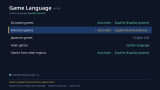
PS4 games from Europe usually include Spanish (Spain) and games from America Latin American Spanish. If your console is set to the other one, the game starts in English. Game Language picks the language each game starts in, according to the game's region.
Install the package and open Game Language. It puts its GoldHEN plugin in place by itself. Then pick a language for each region: Automatic, System language, or any language on the list. Your system language is shown in green. Changes apply the next time a game starts, and the game has to include the language you choose.
It needs GoldHEN's plugin loader on (GoldHEN settings, Plugin settings, Enable Plugin Loader). The app shows a green dot when it is. The developer lists GoldHEN 2.4b18.
Release notes
v1.00 · Nov 13, 2026
Full Changelog: https://github.com/Jorditomasg/ps4-game-language/commits/v1.00