

vLaunchSELF v1.0.1 by VTSTech
A file browser for the PS3 that starts ELF and SELF programs from the drive you pick
Install on your PS3
| File | Size | |
|---|---|---|
| vLaunchSELF.pkg 4d100fef…e686 | 157 KB | Send to PS3 Download |
Other ways to install
On the PS3: open store.brewology.com/ps3/vlaunchself/ in its browser, press Download and install it from Package Manager › Install Package Files in the Game column.
From a USB drive: copy vLaunchSELF.pkg to the root of a USB drive (FAT32), plug it into the PS3 and install it from Package Manager › Install Package Files in the Game column.
Screenshots
About vLaunchSELF
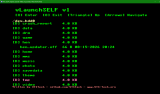
vLaunchSELF is a file browser that launches homebrew ELF and SELF files. When it starts it lists the drives it finds (the Blu-ray drive, hdd0, hdd1, flash and rewrite) and you pick one. The browser shows file sizes and dates, and pressing X on an .elf or .self starts it.
Controls:
- Up/Down: move through the list
- X: open a folder or launch the file
- Triangle: up a folder, or back to the drive list from the top
- O: exit
- L1 or R1 with the D-pad: change the background and text colours
Install the .pkg from the Package Manager on a PS3 with HEN or CFW. It shows up in the Game column.
Release notes
v1.0.1 · Aug 20, 2026
Full Changelog: https://github.com/VTSTech/vLaunchSELF/compare/v1...1.0.1