

Spotify PS3 v1.0.0 by vortigauntlet
An unofficial Spotify Connect receiver: pick PS3 in the Spotify app on your phone and the music plays through the console, with synced lyrics
Install on your PS3
| File | Size | |
|---|---|---|
| Spotify-PS3-5b4442a.pkg 915466e4…978e | 3.9 MB | Send to PS3 Download |
Other ways to install
On the PS3: open store.brewology.com/ps3/spotify-ps3/ in its browser, press Download and install it from Package Manager › Install Package Files in the Game column.
From a USB drive: copy Spotify-PS3-5b4442a.pkg to the root of a USB drive (FAT32), plug it into the PS3 and install it from Package Manager › Install Package Files in the Game column.
Screenshots

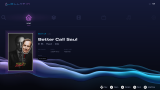
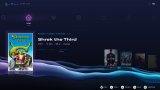

About Spotify PS3
Spotify PS3 makes the console a Spotify Connect speaker. Open Spotify on your phone or computer, choose PS3 in the list of devices, and the music plays through the PS3. Playback follows the phone: skip, pause and the queue stay in the Spotify app.
The player screen is the music player from the developer's Jellyfin client, with its visualisers and focus mode, and the phone's queue shows as Up Next. Synced lyrics come from Spotify, or from LRCLIB when Spotify has none. Triangle shows or hides them. Settings has the audio quality (96, 160 or 320 kbps) and Sign out.
It isn't made by Spotify: it's built on cspot, an open-source Connect receiver. Install the .pkg from Package Manager on HEN or CFW. It installs as title ID SPPS30000.
Release notes
v1.0.0 · Spotify PS3 v1.0.0 · Oct 19, 2026
Spotify Connect receiver for PS3 (title ID SPPS30000).
- Pick "PS3" in the Spotify app's device list to play on the console
- Music player with focus mode and the phone's queue as Up Next
- Synced lyrics (Spotify, LRCLIB fallback); Triangle toggles
- 96/160/320 kbps quality, Sign out in Settings
Install: copy the .pkg to the PS3 and install it from Package Manager.