

ORBIT v1.2.0 by C2V4ZA
Text and voice chat between PS3s: friends, private and group chats, and community servers.
Install on your PS3
| File | Size | |
|---|---|---|
| Orbit-PS3-1.2.0.pkg 0db6e86e…697a | 2.1 MB | Send to PS3 Download |
Other ways to install
On the PS3: open store.brewology.com/ps3/orbit/ in its browser, press Download and install it from Package Manager › Install Package Files in the Game column.
From a USB drive: copy Orbit-PS3-1.2.0.pkg to the root of a USB drive (FAT32), plug it into the PS3 and install it from Package Manager › Install Package Files in the Game column.
Screenshots

About ORBIT
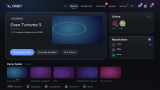
Chat with other PS3 owners from the XMB, with no PSN account. You get friends, private and group chats, and community servers with text and voice channels, roles and moderation. Voice works with a USB or Bluetooth headset. The interface follows the PS3 system language (English, German, French or Spanish).
There's no central server. Each server lives on the PS3 that created it, and friends join with a 20-character code. Consoles on the same network find each other. Over the internet the hosting PS3 opens a tunnel through the public bore.pub service, so anyone with your code can reach it. Connections are encrypted, but the host stores its servers' messages on its hard drive unencrypted.
- Install the PKG from Package Manager > Install Package Files (on HEN, enable HEN first).
- Start Orbit Chat from the Game column.
- Pick your name, then create a server or add a friend with their code.
It needs CFW or HEN. The author says 1.0.3 runs on a real PS3.
Release notes
v1.2.0 · ORBIT 1.2.0 · Nov 20, 2026
ORBIT 1.2.0 — Next Update (preview)
The biggest ORBIT update so far: a new glass interface, Discover, games, background notifications, custom and animated pictures, moderation, signed updates and nine interface languages.
⚠️ Preview build. Background notifications (from 1.1) were confirmed on a real PS3. Most of the new 1.2 features were tested on the desktop only: automated tests, sanitizers and fuzzing, but not yet on real PS3 hardware. Please report problems in Issues.
What's new
Look & navigation
- New glass interface: a shared top bar (L1/R1), Spotlight Home, and Discover and Games grids.
- 8 themes (incl. ORBIT Glass, Deep Space, Crystal and a fast Performance theme), new intro.
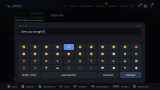
- UI sounds (Off / Quiet / Normal / Loud), emoji keyboard, Do not disturb.
Discover & communities
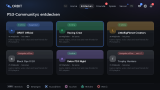
- Discover: browse public communities on connected PS3s, with search, filters, sorting, a details page, and online/offline badges.
- A saved community list, so the page still works when a host is offline.
- Public directory support (signed listings). The directory server is not online yet.
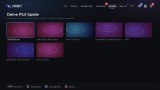
- Games page: your installed PS3 games, plus which friends list or play them.
Profiles & servers
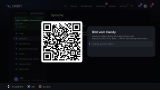
- Profile pictures from a USB stick or your phone. Scan the QR code, choose a photo, done.
- Animated pictures (GIF) for profiles and server icons.
- Limits: at most 10 fps, 15 s and 150 frames.
- Animations pause under heavy load. Reduce motion and Animated pictures off settings are included.
- Server Appearance: own icon (still or animated), symbol, colour and banner, reset to default, preview with crop.
- The change log shows who changed what.
- Only the owner and roles with Manage server may change it, checked by the host PS3.
Safety & moderation
- Report messages and people, with a moderator report list, timed bans (1 / 7 / 30 days / until lifted), and a name filter.
- Block / unblock from anywhere.
- Strict image readers (PNG, JPEG and GIF written for ORBIT, fuzz-tested). Only a re-encoded 96 × 96 version of a picture leaves your PS3, never the original file.
Notifications & presence
- Background notifications (plugin): new messages appear top right in the XMB and in games, even when ORBIT is closed.
- Experimental, separate plugin: show friends which game you are playing. Friends only, off by default.
Languages & keyboard
- 9 interface languages: English, Deutsch, Français, Español, Italiano, Português, and new: Русский, Українська, Norsk bokmål, all fully translated.
- A new Language page lists 27 languages. It honestly marks the ones that are not available yet:
- Japanese, Korean, Chinese and Hindi need a font that ORBIT does not ship yet.
- Arabic needs right-to-left text and letter shaping.
- The other languages are not translated yet.
- Correct plural forms (e.g. 1 игра / 3 игры / 11 игр).
- Cyrillic (RU/UK) and Nordic keyboard layouts, with local word suggestions per language. They learn on your PS3 only.
- Language files are plain text (
USRDIR/lang/*.lang) and are checked line by line. A broken translation can never crash ORBIT.
Updates
- ORBIT can check for signed updates (Ed25519). It saves only packages with a matching signature, size and checksum. Nothing installs on its own.
✅ Advantages
- Still no account, no password, no PC, no router settings: everything runs PS3 to PS3.
- Communities look like your own now (pictures, animated icons, banners, colours), and the host PS3 enforces who may change them.
- Discover makes it easy to find communities, even when a host is offline (saved list).
- Background notifications: you no longer miss messages while gaming.
- Much broader language support, with honest completeness marks instead of half-translated menus.
- Security-first picture handling: strict decoders, limits against "decompression bombs", re-encoding, and fuzz tests.
⚠️ Disadvantages / known limits
- A server is only online while its host PS3 runs ORBIT. If the host switches off, its servers are unreachable. Messages wait on your PS3 until the host is back.
- The new 1.2 features are not yet tested on real PS3 hardware (preview).
- Picture processing runs on the PS3 itself, with no separate sandbox. Large GIFs take a moment to convert.
- Japanese, Korean, Chinese, Hindi and Arabic are not available yet (font / shaping).
- The public directory server and game presence are still experimental or offline.
- Servers on the host PS3 are not end-to-end encrypted: the host PS3 can read its servers' messages. Transport between PS3s is encrypted (TLS).
🚀 Coming soon: ORBIT 24/7 servers
We are working on an always-on ORBIT server. Communities will stay online even when the host's PS3 is switched off. Messages, members and channels will remain reachable around the clock, and the host will no longer need to keep the console running. It will be optional, and ORBIT keeps working PS3-to-PS3 as before.
Install
- Download
Orbit-PS3-1.2.0.pkgbelow. - Copy it to a USB stick (FAT32) and plug it into the PS3.
- XMB › Game › Package Manager › Install Package Files › Standard › choose the file.
- Start ORBIT from the Game column. Your data from 1.0.x is kept and migrated automatically.
Requires a PS3 with custom firmware or PS3HEN. ORBIT is unofficial homebrew and not affiliated with Sony.