

Moonlight PS3 (vortigauntlet) v2.0.0 by vortigauntlet
Stream games and the desktop from your PC to the PS3 with Sunshine, Apollo or GameStream, up to 1080p and 7.1 surround
Install on your PS3
| File | Size | |
|---|---|---|
| Moonlight-PS3-2.0.0.pkg 928d9643…1099 | 921 KB | Send to PS3 Download |
Other ways to install
On the PS3: open store.brewology.com/ps3/moonlight-ps3-vortigauntlet/ in its browser, press Download and install it from Package Manager › Install Package Files in the Game column.
From a USB drive: copy Moonlight-PS3-2.0.0.pkg to the root of a USB drive (FAT32), plug it into the PS3 and install it from Package Manager › Install Package Files in the Game column.
Screenshots
About Moonlight PS3 (vortigauntlet)
Moonlight PS3 streams your PC to the console: pick a game or the desktop on a PC running Sunshine, Vibepollo, Apollo or NVIDIA GameStream and play it on the TV with the PS3's pad, or a USB or Bluetooth keyboard and mouse. This is vortigauntlet's fork of Cruslan's PS3 client. It adds 1080p at 59.94 fps, 5.1 and 7.1 surround, bitrates up to 60 Mbps, DualShock 3 rumble and pressure triggers, and settings for CRT and standard-definition TVs.
720p works with any host settings. For 1080p60 the PC has to encode with software x264 (veryfast, with the zerolatency and fastdecode tunes), which the PS3 can decode in time. The developer's setup-host script for Windows, in the project's tools folder, makes that change for you. A wired PC helps most.
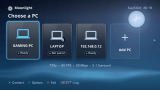
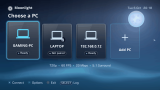
Version 2.0 is a new look: each PC is a card with its status, menus fit 16:9 and 4:3 outputs, every setting has a line of help, and Select shows the log. The developer says the 2.0 screens were made in the RPCS3 emulator and the build hasn't been on a real PS3 yet. The streaming engine is the same as in 1.4.0, which the developer ran on a real PS3.
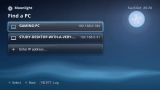
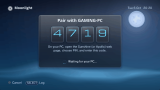
Install the .pkg with Package Manager on a PS3 with CFW or HEN, start Moonlight PS3 and choose Add PC. Type the PIN it shows into the Sunshine web page. On Vibepollo or Apollo, give the PS3 the Launch and Controller permissions under Client Management.
Controls:
- Cross: select or launch
- Circle: back
- Triangle: PC options (connect, quit the game on the PC, remove)
- L1 / R1: page through Settings
- Select + Start + L3 + R3: leave a stream at once
Release notes
v2.0.0 · Moonlight PS3 2.0 · Oct 6, 2026
A new look for Moonlight PS3. The streaming engine is unchanged from 1.4.0.
What's new
- PCs are cards. Each saved PC is a glass card with a status pill (Ready, Not paired, Playing a game), plus Add PC and a Settings card. Triangle opens Options: Connect, Quit game on PC, PC info, Remove PC.
- Aero look, day and night. Glossy glass over an aqua sky with an XMB-style wave and bubbles; Night is a darker Aero. Settings > Screen > Theme: Auto / Day / Night.
- Fits every output. Menus use a 720-high canvas (1280 wide for 16:9, 960 for 4:3) inside a safe margin.
- Settings in plain words. Six sections, a help line under every row, engineer settings under Advanced.
- Clearer pairing and errors. A big PIN, what to do next, and the host's own reason when it says no.
- Log on demand (SELECT) instead of a permanent pane, and short toasts for events.
- The stats overlay is restyled and shows the same fields.
Notes
- The games screen is still a plain list. Box art and a games shelf are planned.
- START still connects to the focused PC.
- Fixed: the letterbox/overscan colour was blue instead of black.
- Existing
config.inifiles keep working;ui_themeis the only new key.
Status
Screens were checked in the RPCS3 emulator at 1080, 720, 576 and 480 in 16:9 and 4:3 (screenshots in docs/screenshots/2.0). This build has not been tested on a real PS3 and TV yet, so reports are welcome. Install the .pkg with Package Manager as before.