

JellyFin PS3 v2.3-beta by Montague McKeefry
A Jellyfin client for the PS3: browse and play the films, TV and music on your own Jellyfin server, with hardware video decoding
Install on your PS3
| File | Size | |
|---|---|---|
| JellyFin-PS3.pkg dca47d42…9237 | 771 KB | Send to PS3 Download |
Other ways to install
On the PS3: open store.brewology.com/ps3/jellyfin-ps3/ in its browser, press Download and install it from Package Manager › Install Package Files in the Game column.
From a USB drive: copy JellyFin-PS3.pkg to the root of a USB drive (FAT32), plug it into the PS3 and install it from Package Manager › Install Package Files in the Game column.
Screenshots

About JellyFin PS3
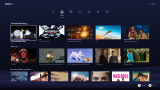
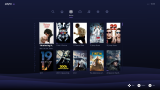
JellyFin PS3 plays your Jellyfin library on the console: films, TV, collections and music, shown as poster grids with an A-Z jump bar. The home screen has Continue Watching, Next Up and Recently Added rows, and every library on your server gets its own tab. Your progress goes back to the server, so you can stop on the PS3 and carry on somewhere else, and the next episode starts by itself. When you open something you've started, it asks whether to resume or start over.
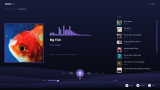
Video is decoded by the PS3's H.264 hardware. The player has a seek bar, volume, and audio and subtitle track menus, and the server burns the subtitles in. 1080p is there as an alpha option. For music there are albums, artists, playlists, genres and songs, a queue with shuffle and a Now Playing screen with a spectrum visualiser. The layout scales down for 480i and 576i sets, and a screen size setting deals with overscan.
You need a PS3 with Evilnat CFW or HEN and a Jellyfin server the console can reach. Install the .pkg from the Package Manager on the XMB, or put it in /dev_hdd0/packages/ and use webMAN MOD's Package Manager. The app looks for a newer release when it starts.
Controls:
- X select, O back, D-pad move, L1/R1 switch tabs, Triangle item info
- In the player: R2/L2 tap to skip 10 seconds or hold to scrub, Start stops
- Select jumps to the next episode while the prompt shows in the last 90 seconds
Release notes
v2.3-beta · 2.3-beta 1080p · Jul 28, 2026
2.3-beta
1080p playback (Alpha)
The player can now request a real 1080p stream instead of always falling back to 720p. Getting there meant rewriting how frames get queued: video used to sit in the buffer as RGB, which gets big fast once you're at 1080p, so I switched the whole pipeline over to YUV. That alone shrank each queued 1080p frame down to about 3MB, which meant I could also raise how many frames get buffered ahead: 24 at 720p, 16 at 1080p. Should mean fewer stutters when the network or the transcode has a rough moment. Still marked Alpha, so if something looks off at 1080p, that's why.
Redesigned movie detail page
The screen you land on before hitting play got a proper visual pass: poster art, cast, and a recommendations row.
Resume or Start Over
Opening something you already started watching now asks whether you want to pick up where you left off or start from the beginning, instead of just always resuming.
Every library shows up now
If you had two libraries of the same type, say two separate movie libraries, or a folder Jellyfin doesn't tag as Movies, Shows, Music, or Collections (a homemade "Anime" folder, home videos, whatever you've got), it used to just disappear. Only one library per type ever made it into the app, and anything untyped was dropped completely. Fixed: every library on your server gets its own tab now, named whatever you called it on the server.
Search results were invisible below 1080p
If you were on 720p or lower, which is most people, scrolling down into search results didn't show you anything. The on screen keyboard was eating all the space the results needed. You could still move the selection around and hit X to play something, you just couldn't see what you were picking. Fixed: the keyboard folds out of the way once you move down into the results.
Live player stats overlay
New Settings toggle: Player Stats Overlay. Turns on a small panel during playback showing fps, frame timing, dropped or duplicated frame counts, audio buffer health, free RAM, and A/V sync drift. Mostly there so I can chase down playback issues, but if you're curious what's going on under the hood, it's there for you too.
Smaller fixes
- Tab switching with L1/R1 now wraps around properly instead of getting stuck once you hit Settings
Also
Relicensed the project under GPLv3.