
HDD Atlas v1.0.0 by daedra000
See what's taking up space on your HDD
Install on your PS3
| File | Size | |
|---|---|---|
| HDDAtlas-v1.0.0.pkg 481deaca…a925 | 12.8 MB | Send to PS3 Download |
Other ways to install
On the PS3: open store.brewology.com/ps3/hdd-atlas/ in its browser, press Download and install it from Package Manager › Install Package Files in the Game column.
From a USB drive: copy HDDAtlas-v1.0.0_brewology_com.pkg to the root of a USB drive (FAT32), plug it into the PS3 and install it from Package Manager › Install Package Files in the Game column.
Screenshots
About HDD Atlas
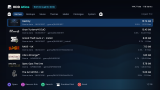
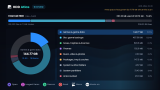
Shows what’s using the space on your HDD and USB drives. It scans a drive and sorts everything into games, disc backups, saves, themes, media, packages and system data, shown as a ring chart you can open right down to the last file.
Free up space: finds leftover packages, caches, duplicate games, unfinished installs, old system updates, and updates and saves for games you no longer have, with the reason for each
Games, all together: each game’s install, backups, saves and trophies added up by title, plus games you haven’t played lately
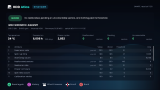
Duplicates and identical files, a map of the drive, and the largest files and folders
Drive health: the internal HDD’s SMART data, read-only, with any warning signs pointed out
Safe deleting (off by default): only safe-to-remove files, held for 7 days in a recycle bin so you can put them back
Reads NTFS USB drives as well as FAT32, and comes in 16 languages
Release notes
v1.0.0 · Nov 11, 2026
Initial Release
Please report any errors to https://ps3.world/contact