

DreamShelf v0.1.6 by richard1222
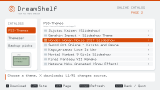
Download PS3 themes directly on your console, with a Dreamcast-inspired interface.
Install on your PS3
| File | Size | |
|---|---|---|
| DreamShelf-v0.1.6.pkg bad7461c…71e3 | 1.1 MB | Send to PS3 Download |
Other ways to install
On the PS3: open store.brewology.com/ps3/dreamshelf/ in its browser, press Download and install it from Package Manager › Install Package Files in the Game column.
From a USB drive: copy DreamShelf-v0.1.6.pkg to the root of a USB drive (FAT32), plug it into the PS3 and install it from Package Manager › Install Package Files in the Game column.
Screenshots
About DreamShelf
DreamShelf downloads PS3 themes directly on your console, with a Dreamcast-inspired interface. Browse PS3-Themes, Themezer and a curated backup catalog, download P3T files to the hard drive, then choose them in XMB Settings > Theme Settings > Theme. CFW or HEN required.
Release notes
v0.1.6 · DreamShelf 0.1.6 · Nov 14, 2026
DreamShelf 0.1.6 — hardware-verified on Evilnat CFW.
Browse PS3-Themes, Themezer, and the curated backup catalog, and download P3T theme files straight to /dev_hdd0/theme/ on your PS3. Install with Package Manager, quit the app, then pick the theme in XMB Settings > Theme Settings > Theme.
What works in this build:
- Full catalog browsing (L1/R1 switch sites, L2/R2 or Up/Down page through results) with a 30-minute cache.
- Controls work even while a catalog is loading — buttons are no longer discarded mid-fetch.
- P3T downloads with progress, cancellation, and clear on-screen error messages.
- Themezer downloads use an API fallback when the detail page offers no direct link.
- Re-download replaces an invalid existing file instead of reporting "already downloaded" forever.
SHA-256 of DreamShelf-v0.1.6.pkg: bad7461c2cd88db226f5ca56eb6f3546c2cc24568134adfeb9e64fdb584871e3