
CRT Toolset v1.6.1 by Gabarsolon
Switches the PS3's analog AV output to 240p or 288p for CRT TVs and sets the analog gamma, with timed tests that switch back by themselves
Install on your PS3
| File | Size | |
|---|---|---|
| CRT-Toolset-1.6.1.pkg 1609ff9a…41c1 | 370 KB | Send to PS3 Download |
Other ways to install
On the PS3: open store.brewology.com/ps3/crt-toolset/ in its browser, press Download and install it from Package Manager › Install Package Files in the Game column.
From a USB drive: copy CRT-Toolset-1.6.1.pkg to the root of a USB drive (FAT32), plug it into the PS3 and install it from Package Manager › Install Package Files in the Game column.
Screenshots
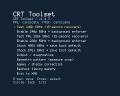
About CRT Toolset
CRT Toolset switches the PS3's AV Multi Out to 240p or 288p for a CRT TV, and sets the analog gamma. It changes the console's video timing while it runs: a reboot puts everything back to stock, and you turn it on again after each boot.
Set the AV Multi Out to 480i (NTSC) or 576i (PAL), start CRT Toolset and pick Test 240p or Test 288p. Press Cross during the countdown to keep the mode, or wait 15 seconds and it switches back. Then choose that mode's Enable enforcement, confirm the picture and go back to the XMB. The stock 480i and 576i choices turn the correction off and save that mode as the default. For RetroArch at 240p the developer has a settings guide in the repository's docs folder.
Gamma / shadow correction takes a value from 0.50 to 4.00: 1.00 is neutral and higher values brighten the shadows. Test system gamma has the same countdown, and Restore system gamma puts the original curve back. Version 1.6.0 also has timed tests of HDMI custom resolutions (540p, 1024x768, 1280x768, 1280x1024 and 1920x1200), which the author calls experimental.
It needs custom firmware with Cobra: the timing patch uses LV1 access, so HEN isn't supported. Saving boot defaults also needs webMAN MOD. The developer lists Evilnat 4.93 CEX with Cobra. Close the app before updating, install the update from Package Manager on the XMB (the developer saw webMAN's remote install freeze the console) and reboot afterwards. The log is /dev_hdd0/tmp/ps3_240p.log.
Release notes
v1.6.1 · CRT Toolset v1.6.1 (SCART RGB DVD fix) · Nov 21, 2026
CRT Toolset v1.6.1: SCART RGB DVD fix
Everything in v1.6.0 (single-SD-family 240p/288p, HDMI custom resolutions)
plus a new menu, SCART RGB DVD fix.
What it does
On a SCART RGB setup, the PS3's native DVD and Blu-ray player switches the AV
MULTI output from RGB to component video, so the picture turns green or purple.
This release bundles the plugin that fixes it and lets you turn it on from the
app.
- Load now until reboot: installs the plugin into
/dev_hdd0/plugins/and loads it into a free VSH slot. Nothing is unloaded. - Load at every boot: adds or removes the plugin's line in
/dev_hdd0/boot_plugins.txt. The original list is saved once asboot_plugins.txt.crt-backup, the new list is read back, and the original is restored if the readback differs. - About / credits.
Set Video Output to AV MULTI / SCART with RGB. Play a DVD or Blu-ray from
the XMB; the plugin keeps the output RGB. HDMI is not affected.
Credit
The fix is RGB DVD Patch for PS3 (disc_rgb_fix 2.1.3) by WeebLabs,
MIT licence: https://github.com/WeebLabs/RGB-DVD-Patch-for-PS3. It is included
unmodified (SHA-256aff98e5da5b8d0826ab1e9e645d51e7bfd37ffb1027903056b60d7a6f13b1ca1) with its
licence text (WeebLabs-LICENSE.txt in the app's USRDIR). All credit for the
mechanism and plugin goes to them. This project only adds the menu and the boot
option.
Validation
- PROVEN (owner, Evilnat 4.93, SCART RGB, DVD): picture correct, both loaded at runtime and loaded from
boot_plugins.txtafter a reboot. Log linesREWRITE: DVD-start batch kept RGBandsend result 0x74. - CLAIMED (plugin author): written and tested on Evilnat 4.92 + Cobra 8.5. The plugin checks the exact VSH send wrapper and does nothing if it differs; the same bytes were found in the 4.93 VSH.
- UNKNOWN: Blu-ray on 4.93, other firmware, other CFW.
Build
python -B tools/build_ps3_app.py --sd-timing-fix -> CRT-Toolset-1.6.1.pkg,
APP_VER 01.82, in-app 1.6.1.
SHA-256: 1609ff9a6b620b1142f8ccd9bba08e2ac2f9db48e452351fa355150b310841c1
If the console fails to boot after adding a plugin
Start Recovery Mode and choose Restart System. On Evilnat this boots without
plugins. Then remove the line from boot_plugins.txt (or restoreboot_plugins.txt.crt-backup).