

Chiaki-ng PS3 v1.0.0-beta4 by ThoraldM
PS4 and PS5 Remote Play on a PS3: a port of the open-source chiaki-ng client, played with a DualShock 3 on your home network
Install on your PS3
| File | Size | |
|---|---|---|
| chiaki-ps3.pkg 5d458acb…570f | 1.0 MB | Send to PS3 Download |
Other ways to install
On the PS3: open store.brewology.com/ps3/chiaki-ng-ps3/ in its browser, press Download and install it from Package Manager › Install Package Files in the Game column.
From a USB drive: copy chiaki-ps3.pkg to the root of a USB drive (FAT32), plug it into the PS3 and install it from Package Manager › Install Package Files in the Game column.
Screenshots

About Chiaki-ng PS3
Chiaki-ng PS3 is ThoraldM's port of chiaki-ng, the open-source Remote Play client, to the PS3. It streams your PS4 or PS5 to the TV the PS3 is on, and you play with a DualShock 3. The developer lists 720p at 60 fps, decoded by the PS3's hardware video decoder, stereo sound, and analogue L2/R2 with vibration.
The app finds the consoles on your home network, wakes them from rest mode and pairs with the 8-digit PIN from the console's Remote Play settings. The first time, it asks for your PSN account ID: chiaki-ng on a PC or Mac shows it after you sign in to PSN in its settings. Already using chiaki-ng on a computer? Export its settings, turn them into chiaki.cfg with the export_keys.py script in the developer's repository, and import that from a USB stick.
It needs custom firmware that installs homebrew packages: the developer lists Rebug with Cobra, and recommends a wired network for both consoles. Remote Play over the internet, 1080p, HEVC, the microphone, motion controls and touchpad gestures aren't supported. This is the first public release, a beta.
Controls:
- SELECT + START: PS button
- SELECT (tap): SHARE / Create
- SELECT + X: touchpad click
- SELECT + Triangle: stats overlay
- SELECT + Circle, held for 1 second: end the stream
Release notes
v1.0.0-beta4 · Nov 17, 2026
Chiaki-ng PS3 v1.0.0-beta4
First public release: PS4 and PS5 Remote Play on a homebrew PS3, based on
chiaki-ng.
Download
chiaki-ps3.pkg below. Install it with Package Manager → Install Package Files (CFW with homebrew
support required; tested on Rebug + Cobra). Setup, pairing and controls: see the
README.
What works
- PS4 and PS5 streaming at 720p / 60 fps, H.264 decoded by the PS3's hardware decoder
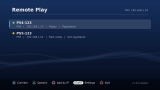
- XMB-style start menu: finds your consoles on the network, shows if they are ready or in rest mode
- Wake from rest mode and PIN pairing from the PS3 itself
- Type your PSN account ID on the PS3 (on-screen keyboard): no PC needed to set up
- Add a console by IP address; import your chiaki-ng PC/Mac settings from a USB stick (
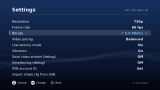
ps3/tools/export_keys.py) - Resolution (360p / 540p / 720p) and bitrate settings
- Stats overlay (SELECT + △): frame rate, decoder delay, audio buffer, bitrate
- Error messages that say what to check
- Frame pacing setting: lowest delay / balanced (default) / smoothest. About 98.7% of frames reach the screen with "Balanced" in testing.
- Low-latency mode (on by default): each frame is picked just before the TV refresh
- Stereo audio with an adaptive buffer and clock drift correction, so the delay doesn't build up
- DualShock 3 with analog L2/R2 (pressure sensors) and vibration; SELECT combos for SHARE, PS button and touchpad click; hold SELECT + ○ for 1 s to end the stream
- Retries by itself if a console isn't ready yet (for example right after another stream)
chiaki.logwith connection details and stats every 5 s, for bug reports
Known limitations
- 720p H.264 only: no 1080p and no HEVC (PS3 decoder limits)
- Wired network strongly recommended
- Pairing needs your PSN account ID once (see the README for where to find it)
- Not supported: Remote Play over the internet, login passcode, microphone, motion controls, touchpad gestures, button remapping
- The PS3's decoder holds each picture for one frame (~17 ms); this is part of the hardware decoder
- Tested on a single PS3 setup (Rebug + Cobra, standard PS4, PS5). Reports from other setups are welcome.
Reporting bugs
Open an issue and attach /dev_hdd0/game/CHIAKIPS3/USRDIR/chiaki.log (it contains no passwords or keys,
but does contain your local IP addresses and console names).
License
AGPL-3.0, the same as chiaki-ng. The source code for this build is the tagged commit of this repository.
Not affiliated with Sony Interactive Entertainment.