

air-ps3-visualizer v1.0.0 by spookyjbp
Turn your PlayStation 3 into an AirPlay speaker with a music visualizer.
Install on your PS3
| File | Size | |
|---|---|---|
| air-ps3-visualizer-1.0.0.pkg 1a6a5e4e…c8c7 | 3.2 MB | Send to PS3 Download |
Other ways to install
On the PS3: open store.brewology.com/ps3/air-ps3-visualizer/ in its browser, press Download and install it from Package Manager › Install Package Files in the Game column.
From a USB drive: copy air-ps3-visualizer-1.0.0.pkg to the root of a USB drive (FAT32), plug it into the PS3 and install it from Package Manager › Install Package Files in the Game column.
Screenshots
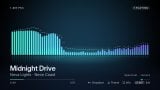
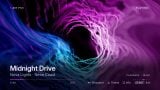
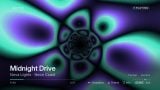
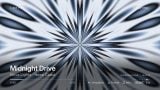
About air-ps3-visualizer
Stream audio from your iPhone to a PS3 running custom firmware. Pick AirPS3 in the iPhone's AirPlay menu and the console plays the sound, shows what's playing, and animates to the music.
AIR PS3 Visualizer builds on AIR PS3 by EsKaye (MIT licensed). The AirPlay 1 receiver is the same; this edition adds the animated interface. It installs as its own app (AIRPLAY03), so it can sit next to the original AIR PS3.
Features
Now playing: song title (wrapped onto extra lines so long names show in full), artist and album, a progress bar, and a status label (Ready / Connecting / Playing / Paused). Song info comes from the iPhone.
Nine visualizers
Classic: Spectrum, Ribbons (XMB-style waves), Halo, Scope, Nebula
Trippy, full screen: Feedback (MilkDrop-style), Tunnel, Kaleidoscope, Plasma
Six color themes: Aurora, Sunset, Silver, Ocean, Neon, Ember.
Overlays: a volume bar when you change volume on the phone, and a label when you switch visualizer or theme.
Your visualizer, theme and info-panel choices are remembered.
Release notes
v1.0.0 · AIR PS3 Visualizer v1.0.0 · Nov 16, 2026
AIR PS3 Visualizer v1.0.0
First release of AIR PS3 Visualizer: the AIR PS3 AirPlay 1 receiver with an animated, music-reactive interface.
New
Now-playing screen: title (wraps so long names show in full), artist and album, progress bar, and status (Ready / Connecting / Playing / Paused).
Nine visualizers: Spectrum, Ribbons, Halo, Scope, Nebula, plus the trippy full-screen modes Feedback (MilkDrop-style), Tunnel, Kaleidoscope and Plasma.
Six themes: Aurora, Sunset, Silver, Ocean, Neon, Ember.
Volume and mode/theme overlays; choices are remembered.
Installs as its own app (AIRPLAY03), alongside the original AIR PS3.
New XMB icon; no XMB background image.
Under the hood
The interface runs on its own thread below the audio thread, so a slow frame lowers the frame rate rather than interrupting audio. If it fails, the app falls back to a static screen.
Frames are scaled to the TV's resolution by the PS3's graphics chip.
Track text and progress are read from the iPhone (md=0,2); artwork isn't supported.
Known limits
Frame rate on hardware is still being tuned; the log records frame timing (VISUAL_* lines in /dev_hdd0/tmp/air-ps3-visualizer.log).
Same receiver limits as AIR PS3: AirPlay 1 audio only, foreground app, custom firmware required.