

SCR2JPG v1.2.0 by Adrix12team
Turns Luma3DS screenshots into photos the 3DS Camera can open
Install on your 3DS
Method 1Scan the QR code
With FBI (Remote Install › Scan QR Code) or 3dsDL (Scan QR Code). Either one installs it.
Method 2Send it to your 3DS
Open 3dsDL › Receive on the same Wi-Fi, then press:
Send to 3dsDL Not working?
Other ways to install
From your SD card: copy SCR2JPG.3dsx into /3ds/ and start it from the Homebrew Launcher.
Send can't find your 3DS? Type the address 3dsDL shows on Receive, then press Send.
Send to 3dsDL
Files
Screenshots
About SCR2JPG
Converts the BMP screenshots Luma3DS saves on the SD card into JPEGs. Top-screen screenshots in 3D become MPO files, the format the 3DS uses for 3D photos. You can keep or delete the original BMPs, and kept ones won't be converted again.
Each photo gets the date and time from the screenshot's file name. If the name isn't in a format it recognises, the photo shows up as 1 January 2001.
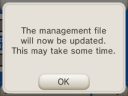
If converted pictures don't show in the Camera, its management file hasn't been updated yet. What works for the author: open the Camera and click around the photos and settings until a message pops up.
Each photo gets the date and time from the screenshot's file name. If the name isn't in a format it recognises, the photo shows up as 1 January 2001.
If converted pictures don't show in the Camera, its management file hasn't been updated yet. What works for the author: open the Camera and click around the photos and settings until a message pops up.
Release notes
v1.2.0 · 1.2.0: 3D screenshot support, prevention of duplicate screenshots, minor changes · Aug 8, 2026
If you've previously installed SCR2JPG and used it, make sure to DELETE SCR2JPG.txt from sd:\DCIM\ to prevent bugs from the old system!
- 3D screenshot (top screen) support
- SCR2JPG.txt now stores more information about converted screenshots, so that screenshots will be automatically skipped if previously converted
- Minor changes