

Gemini3DS v2.1 by stefanoborra20
Unofficial Google Gemini client, with photos from the 3DS camera
Install on your 3DS
Method 1Scan the QR code
With 3dsDL (Scan QR Code). Save it to sdmc:/3ds/.
Method 2Send it to your 3DS
Open 3dsDL › Receive on the same Wi-Fi, then press:
Send to 3dsDL Not working?
Other ways to install
From your SD card: copy Gemini3DS.3dsx into /3ds/ and start it from the Homebrew Launcher.
Send can't find your 3DS? Type the address 3dsDL shows on Receive, then press Send.
Send to 3dsDL
Files
| File | Size | SHA-256 | |
|---|---|---|---|
| Gemini3DS.3dsx | 1.7 MB | f893c17e…cc26 | Download |
Screenshots
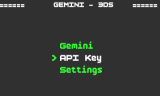
About Gemini3DS
Chat with Google's Gemini models from the 3DS, and send them photos taken with the console's camera.
You need your own Gemini API key. Enter it in the app the first time and it gets saved to a file on the SD card. The .3dsx goes in /3ds/gemini/.
For photos, stick to the Flash or Flash Lite models. The heavier ones take long enough to work through an image that the 3DS gives up on the connection.
You need your own Gemini API key. Enter it in the app the first time and it gets saved to a file on the SD card. The .3dsx goes in /3ds/gemini/.
For photos, stick to the Flash or Flash Lite models. The heavier ones take long enough to work through an image that the 3DS gives up on the connection.
Release notes
v2.1 · v2.1 - Image Prompting · Aug 10, 2026
📸 Image Prompting
What's new:
- Image prompting: You can now use the 3DS camera to take photos and send them directly to Gemini alongside a custom text prompt.
- Multi-Key Management & Auto-Rotation: Save multiple API keys to your SD card. If a rate limit (HTTP 429) is reached, the app automatically swaps to the next saved key and retries the prompt.
Bug Fixes
- Functional AI Settings: Temperature and Max Tokens settings now correctly map to the Gemini API, granting full control over response creativity and length.
- Mid-Sentence Cutoff Fix: Raised the default Max Token limit from 100 to 1000. Gemini will no longer run out of "thinking tokens" and cut off your answers after a few words.
> 💡 Tip for Camera Users:
> When sending images from the 3DS, stick to the Flash or Flash Lite models. Heavier models take significantly longer to process image data, which can cause the 3DS to hit a network timeout.